

Exclusive Synthesia Deal
Click to reveal your exclusive code and save up to 38% on annual Starter and Creator plans.
Try Synthesia Free — No Credit Card Needed
Generate AI avatar videos in 140+ languages before you commit to a paid plan.
SHORT SUMMARY
- Synthesia turns scripts, prompts, PDFs, URLs, and PowerPoints into avatar-led business videos with voices, dubbing, and localization.
- Pricing: Basic (free), Starter ($29/mo), Creator ($89/mo), Enterprise (custom, typically $25,000–$40,000/year).
- Beyond the sticker price, watch for real extra costs: custom avatars run about $1,000/year each, overage fees apply once you exceed your monthly minutes, and every teammate needs their own paid seat.
- Credits don’t roll over month to month, so unused minutes are lost at the end of each cycle.
- Best for business teams needing repeatable training, sales, or internal video, not solo creators on a tight budget.
What Is Synthesia?
Synthesia is an AI video creation platform that turns scripts, prompts, PDFs, URLs, and PowerPoints into avatar led videos with built in voices, dubbing, and localization features.
It is positioned for business video production rather than general consumer editing. Synthesia is built for teams that need repeatable video creation across training, sales enablement, internal communications, customer education, and multilingual business workflows.
Who It Is For
It fits learning and development teams, sales teams, marketers, customer support teams, and internal communications teams that need repeatable business video production without cameras or studios.
Best Use Case
It works best for training videos, onboarding, product explainers, sales enablement, and multilingual internal content that needs a presenter style format.
Standout Value
Its standout value is speed and scale, because Synthesia combines AI avatars, voiceovers, localization, and business templates inside one browser based workflow.
What Synthesia Really Costs
The subscription price is only part of the picture. Independent pricing research turned up several real extra costs worth budgeting for before you commit:
- Custom avatars cost extra. Creating a custom avatar based on a real person runs roughly $1,000 per avatar, per year, on top of your plan.
- Overage fees apply once you exceed your monthly minutes. Starter and Creator both cap your video minutes each month. Going over costs an estimated $2 to $5 per extra minute.
- Credits don’t roll over. Unused minutes reset at the end of each billing cycle instead of carrying forward.
- Every teammate needs their own subscription. There’s no discounted per-seat add-on, each person creating videos needs a full paid plan of their own.
- Enterprise isn’t cheap. While Synthesia lists Enterprise as “custom pricing,” independent data based on real purchases puts the typical annual spend between $25,000 and $40,000, with a reported median around $30,000.
None of this means Synthesia is a bad deal, it’s a genuinely capable platform, but going in with a real budget picture avoids surprises later.
Setup Time and Support
Setup is fast because Synthesia offers a free entry point and a workflow built around turning existing text or files into video in minutes. Paid plans add chat and email support, while Enterprise adds onboarding and implementation services.
One thing to double check at checkout: Synthesia’s own site has shown two slightly different annual prices in different places, plan cards around $18/mo and $64/mo, versus FAQ-listed totals of $264/year ($22/mo) and $804/year ($67/mo) for Starter and Creator. Our pricing table below reflects the FAQ totals, but confirm the exact number at checkout before you commit to annual billing.
Why Synthesia Stands Out
It stands out because it is not just an avatar generator. It is a business focused AI video system with dubbing, multilingual playback, custom avatars, API access, and collaboration features for teams.
Key Features
| Feature | What it does | Why it matters |
| AI avatars | Gives users access to stock AI avatars, with higher tiers unlocking more avatars and Enterprise unlocking the full stock library. | Makes presenter style video production possible without filming talent for every video. |
| AI voices and languages | Supports broad multilingual voice coverage across business video workflows. | Helps teams create training, sales, and internal content for multiple regions from one workflow. |
| AI dubbing | Translates videos into 139 languages, with lip sync, subtitles, and multi speaker support. | Improves localization and lets one source video scale across markets faster. |
| Custom and personal avatars | Supports custom avatars based on real people, including personal avatars and studio options. Budget roughly $1,000/year per custom avatar. | Gives teams stronger brand consistency and personalized video communication. |
| API access | Creator and Enterprise plans include API access for programmatic video workflows. | Extends Synthesia beyond the browser editor for product and automation use cases. |
| Interactive and branded video experiences | Includes branded video pages on paid tiers and interactive videos on Creator and above. | Helps teams publish business ready videos with stronger brand control and viewer engagement. |
| Team collaboration and admin controls | Higher plans add more editors and guests, while Enterprise adds SSO and live team collaboration. Note: each video creator needs their own paid seat. | Makes Synthesia more usable for multi stakeholder production and governance. |
| LMS and business integrations | Official integrations include platforms like 360Learning, Articulate 360, Docebo, Crowdin, BigCommerce, and Make. | Improves fit for learning, localization, ecommerce, and customer education workflows. |
Synthesia Top Integrations
Synthesia integrates best with learning platforms, customer education tools, automation layers, presentation workflows, and website publishing tools. That makes it especially useful for teams that want AI video creation to fit into existing training and business systems rather than run as a separate content tool.
- Articulate 360: Embed Synthesia videos directly into Articulate 360 training modules for faster eLearning production and updates.
- 360Learning: Add Synthesia videos into collaborative learning courses to improve training engagement and scale internal enablement.
- Docebo: Use Synthesia videos inside Docebo courses to make learning content more visual and easier to localize.
- Crowdin: Connect Synthesia with Crowdin to streamline translation workflows for multilingual video content.
- Intercom: Embed Synthesia videos into Intercom experiences to support customer onboarding, support, and product education.
- PowerPoint: Turn PPT files into narrated AI videos faster, which is useful for sales decks, onboarding, and internal communications.
- BigCommerce: Add AI generated videos to BigCommerce product and website pages to improve product education and conversions.
- Make: Automate video creation workflows by connecting Synthesia with other tools through Make’s no code automation layer.
Pros and Cons of Synthesia
| Pros | Cons |
| Broad Business Workflow: Offers AI avatars, multilingual voices, templates, and API access for a complete video production cycle. | High Entry Pricing: Monthly pricing for solo users can be quite high, which may act as a barrier for lighter or personal use cases. |
| Advanced AI Dubbing: Supports 139 languages with high-quality lip sync, subtitles, and multi-speaker support for global reach. | Real Costs Beyond the Sticker Price: Custom avatars, overage minutes, and per-seat pricing can add up fast, budget for these before committing. |
| Training & LMS Support: Excellent integration with learning platforms like Articulate 360, 360Learning, and Docebo. | Specialized Video Style: Focused purely on presenter-style videos, making it less flexible for cinematic or highly custom motion work. |
| Scalable Localization: Combines avatars, dubbing, and subtitles in one system, making localization more efficient than many alternatives. | Scalability Constraints: Only the Enterprise tier offers unlimited minutes, meaning growing teams may quickly outgrow lower plans. |
| Business Integrations: Supports LMS, CMS, and automation workflows, making it a strong fit for professional operational ecosystems. | No Rollover Credits: Unused minutes reset every month instead of carrying forward. |
Synthesia Pricing Plans
Verify pricing on the official website, especially the annual totals noted above. The information may change.
| Plan | Price | What it includes |
| Basic | Free | Includes 1 editor, 9 AI avatars, 1,200 credits per month, and up to 10 minutes of video per month. It works as the entry point for testing Synthesia without a credit card. |
| Starter | $29/month, or $264/year on annual billing | Includes everything in Basic, plus downloads, AI Video Assistant, AI Dubbing, logo removal, 1 editor and 3 guests, 125+ AI avatars, chat and email support, and up to 10 minutes of video or dubbing per month. |
| Creator | $89/month, or $804/year on annual billing | Includes everything in Starter, plus 5 personal avatars, branded video pages, API access, multiple avatars per scene, interactive videos, 1 editor and 5 guests, 180+ AI avatars, priority support, and up to 30 minutes of video or dubbing per month. |
| Enterprise | Custom pricing, typically $25,000–$40,000/year (median around $30,000) | Includes everything in Creator, plus unlimited video minutes, 1-click translations into 80+ languages, 240+ stock avatars, unlimited personal avatars, SSO, live team collaboration, Brand Kits, SCORM export, tailored onboarding, implementation services, and a dedicated customer success manager. |
The safest way to find a valid Synthesia coupon is to check the official pricing page first. Synthesia publicly highlights plan pricing and annual billing savings, but it does not present a general public coupon code system.
Reviews
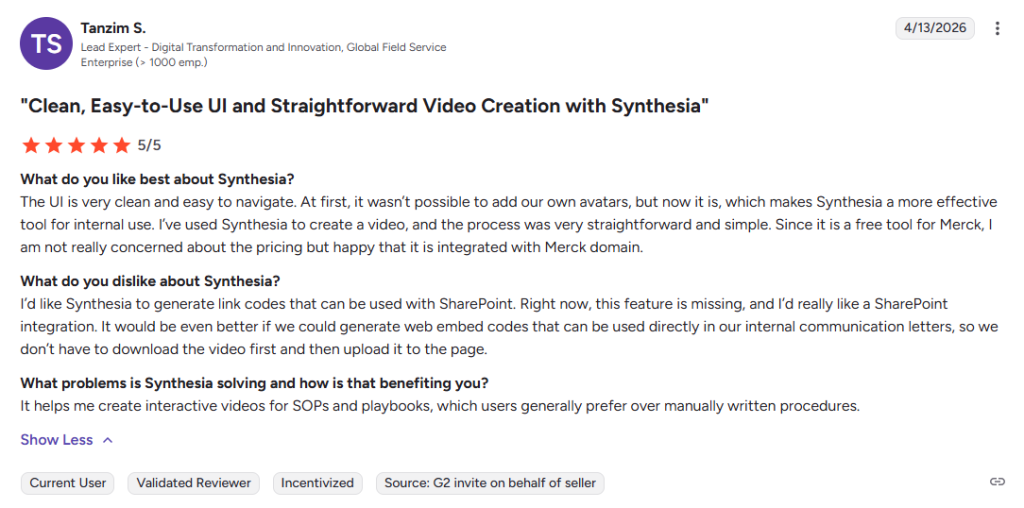
Public Synthesia reviews are generally positive overall. Review themes commonly mention avatar quality, multilingual video creation, and speed of production as strengths, while pricing, moderation friction, and limits around customization appear as recurring drawbacks.
Alternatives of Synthesia
- HeyGen is best for teams that want AI avatar videos, video translation, voice cloning, and stronger creator to team plan flexibility in one platform. Choose it when avatar video, localization, and lower entry pricing matter more than Synthesia’s enterprise training focus.
- Colossyan is best for learning and development teams that need presenter led video, course authoring, branching, quizzes, and SCORM ready training workflows.
- Elai is best for teams creating learning content from documents, blog posts, PPTs, and multilingual training materials with AI avatars.
- FlexClip is best for teams that want a simpler template-based editor with AI subtitles, text-to-video, and stock assets, and no per-seat or per-avatar add-on fees.
- Vyond is best for business teams that need AI video generation plus broader animation styles, templates, and internal communication or training use cases.
- VEED is best for teams that want browser based editing, AI avatars, text to speech, subtitles, and all in one video production from a simpler editor style interface.
FAQs of Synthesia
Final Verdict
Synthesia is a strong AI video platform for businesses that need professional videos without a studio or complex production process. Its AI avatars, multilingual video tools, PowerPoint to video features, and team workflows make it a good choice for training, sales, onboarding, and internal communication.
The cost can increase with extra minutes, custom avatars, and additional users, so check the current Synthesia pricing before choosing a plan. A Synthesia coupon or available discount can help reduce the cost of a paid subscription.
Overall, Synthesia is worth considering for businesses that create video content regularly. Solo creators and budget focused users may also want to compare alternatives such as HeyGen and FlexClip before committing to a paid plan.


