

Exclusive Unicorn Platform Deal
Click to reveal your exclusive code and save 30% on any annual plan.
Build Your Website Free — No Credit Card Needed
Launch a professional landing page with Unicorn Platform's free-forever plan.
SHORT SUMMARY
- Unicorn Platform is a no-code, AI-assisted website builder built for founders who want to launch fast.
- Paid plans start at $14/mo ($9/mo billed yearly). Yearly billing saves over 30%.
- The free Lurker plan is great for testing the editor, but it cannot publish a live website. You need a paid plan to actually launch.
- Real user reviews (G2, Product Hunt, AppSumo) rate it highly for speed and ease of use, with template variety and deeper customization as the most common complaints.
- Best for solo founders and small teams who want to go live fast. Not the best fit if you need heavy design customization, that’s where Webflow or Framer fit better.
What Is Unicorn Platform?
Unicorn Platform is an AI-powered, no-code website builder for founders, startups, app creators, directory owners, bloggers, and individuals who want to launch a website fast without design or development skills.
It combines AI-assisted editing, ready-made templates, blogging, custom code support, Stripe payments, and a free plan for testing before you commit.
Who It Is For
It fits founders, solo entrepreneurs, indie hackers, and small teams that need a simple builder for launches, SaaS sites, blogs, and landing pages.
Best Use Case
It works best for startup landing pages, product sites, and simple content-driven websites that need to go live fast, without deep custom design work.
Standout Value
Its standout value is speed. Unicorn Platform combines no-code editing, AI prompts, and ready-made templates into one fast launch workflow, and real user reviews on G2 and Product Hunt consistently back this up, rating it 4.8 out of 5 for ease of use and shipping speed.
Which Unicorn Platform Plan Fits You?
Every plan increases in one of three ways: how many live websites you can publish, whether your blog is capped at 10 posts, and how many people can collaborate. Here’s a simple way to pick:
- Just testing the builder: Lurker (free). You can build and preview, but you cannot publish a live site yet.
- One founder, one project: Maker ($14/mo, $9/mo yearly). Publishes 1 website, but blog posts are capped at 10.
- One founder who blogs regularly: Startup ($49/mo, $29/mo yearly). Same 1 website, but unlimited blog posts and your first collaborator seat, useful once content marketing becomes part of your launch plan.
- Small team, a few projects: Business ($69/mo, $49/mo yearly). Publishes 3 websites with unlimited collaborators.
- Freelancer managing several client sites: Freelancer ($99/mo, $79/mo yearly). Publishes 8 websites, a tier many pricing pages leave out, but it sits right between Business and Agency for exactly this use case.
- Agency or portfolio operator: Agency ($179/mo, $139/mo yearly) for 20 sites, or Major ($350/mo, $250/mo yearly) for 100 sites.
One thing to plan around: if content marketing matters to your launch, notice that unlimited blogging only starts at Startup, not Maker. Founders who plan to blog regularly are often better off skipping Maker and going straight to Startup.
Setup Time and Support
Setup is fast. You can start on the free plan and use AI to generate or edit pages from prompts. Real user reviews describe going from blank page to a working draft in under an hour.
Why Unicorn Platform Stands Out
It’s built specifically for founders who want launch speed and simple editing, with enough flexibility to add custom code when needed. The most common trade-off, based on independent reviews, is that template variety and deep design customization are more limited than design-first tools like Webflow or Framer.
Key Features
| Feature | What it does | Why it matters |
| AI website builder | Creates websites and page updates from prompts. | Helps founders move from idea to live draft faster. |
| No-code editor | Build and edit without coding skills. | Reduces launch friction for solo founders. |
| Templates and sections | Ready-made website and section templates. | Faster path to a polished page than starting blank. |
| Blog publishing | Built-in blogging, capped at 10 posts on Lurker and Maker, unlimited from Startup up. | Supports content marketing and SEO once you’re on the right plan. |
| Custom code | Add your own HTML, CSS, and JavaScript. | Gives technical users more flexibility. |
| Payments with Stripe | Accept payments directly. | Lets founders monetize simple sites directly. |
| Form integrations | Zapier and Mailchimp on all plans; Google Sheets and email sending on paid plans. | Improves lead capture and automation. |
| Publishing and export controls | SSL, CDN, custom domains, HTML export, reCAPTCHA on paid plans. | Easier to launch on a real domain with more control. |
Unicorn Platform Top Integrations
Unicorn Platform’s strongest integrations focus on lead capture, email marketing, automation, payments, and live chat rather than a broad app marketplace. That makes it more practical for lean startup sites than for teams that need a deep native software ecosystem.
- Zapier: Connect forms to thousands of apps.
- Mailchimp: Send captured emails directly into your lists.
- Google Sheets: Route form submissions for simple lead tracking (paid plans).
- MailerLite: Connect forms for list building and campaigns.
- Stripe: Accept payments directly on your pages.
- Crisp: Add live chat through custom code.
Pros and Cons of Unicorn Platform
Unicorn Platform’s biggest strength, confirmed by real user reviews on G2 and Product Hunt, is launch speed. The most common trade-off is template and design flexibility compared to more design-focused builders.
| Pros | Cons |
| Fast launch workflow with AI generation, templates, and no-code editing. | Free plan cannot publish a live website, it’s for testing only. |
| Real users rate it 4.8/5 on both G2 and Product Hunt for speed and ease of use. | Blog posts capped at 10 on Lurker and Maker plans. |
| Built-in blogging for SEO and content marketing. | Some users want more template variety and deeper style controls. |
| Stripe payments and custom code for more flexibility. | Team collaboration is limited on entry tiers. |
| Practical lead capture through Zapier, Mailchimp, and MailerLite. | Google Sheets and direct email sending are paid-only features. |
Unicorn Platform Pricing Plans
Prices reflect current published pricing. Always confirm on the official website before buying.
| Plan | Monthly | Yearly (per month) | Published Sites | Best Fit |
| Lurker | Free | Free | 0 (testing only) | Trying the builder before committing |
| Maker | $14 | $9 | 1 | Solo founder, single project, light blogging |
| Startup | $49 | $29 | 1 | Solo founder who blogs regularly, needs 1 collaborator |
| Business | $69 | $49 | 3 | Small team running a few projects |
| Freelancer | $99 | $79 | 8 | Freelancers managing several client sites |
| Agency | $179 | $139 | 20 | Agencies managing many client or portfolio sites |
| Major | $350 | $250 | 100 | High-volume operators needing large-scale capacity |
Unicorn Platform does not publish a general public coupon code. The clearest verified savings path is yearly billing, which saves over 30%, plus a 30-day money-back guarantee.
Unicorn Platform Reviews
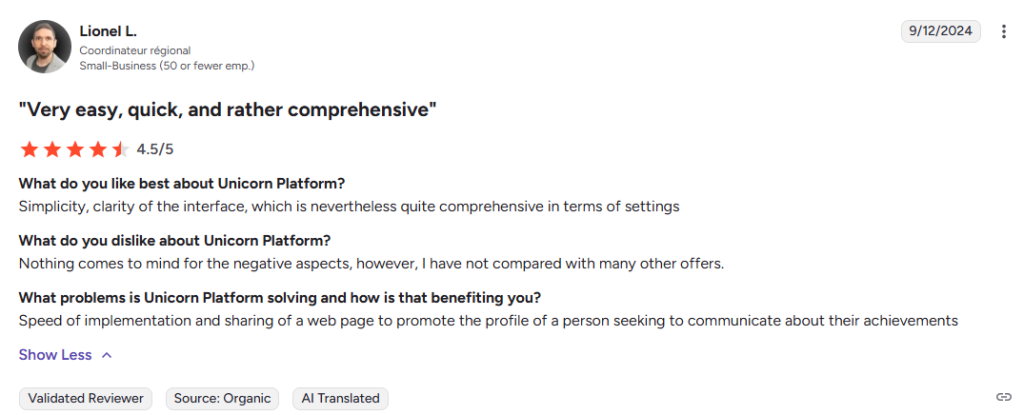
Unicorn Platform holds strong ratings across review platforms: 4.8/5 on G2 and 4.8/5 on Product Hunt. Reviewers consistently praise launch speed and ease of use. The most repeated, honest criticism is a desire for more modern templates and finer style controls like fonts and alignment.
Alternatives of Unicorn Platform
- Carrd is best for ultra simple one page sites at very low cost.
- Framer is best for teams that want stronger design control, a built-in CMS, and analytics.
- Typedream is best for a Notion-like editing experience for landing pages and directories.
- Dorik is best for AI site generation with CMS and membership features.
- Webflow is best for teams needing advanced design control and room to scale.
- Leadpages is best for marketers focused on lead capture and A/B testing.
- B12 is best for service businesses that also need built-in client intake and scheduling.
FAQs of Unicorn Platform
Final Verdict
Unicorn Platform is a strong pick if you want to go from idea to a live, working website fast, without a steep learning curve. It’s not the best pick if deep design customization or a large template library matters more to you than launch speed, Webflow or Framer fit that need better.
Best for: Founders and small teams who want a fast, no-code launch. Skip it if: You need heavy design customization or a big template library. Remember: the free plan is for testing only. You’ll need at least the Maker plan to publish your site live.


