What Is HitPaw?
HitPaw is an AI video, photo, and audio tool suite, so hitpaw coupon intent should be checked against official promotions, education offers, and product specific checkout pages before assuming one universal coupon code exists. HitPaw’s official site groups its products around AI video enhancement, video conversion, photo enhancement, voice changing, video editing, compression, background removal, watermark removal, and online AI tools.
HitPaw is not a single feature SaaS product. It is a software ecosystem covering desktop tools, online tools, mobile apps, and developer APIs for creators who need media enhancement, editing, conversion, cleanup, and generation workflows.
Who It Is For
HitPaw is for creators, marketers, video editors, photographers, educators, streamers, and small businesses that need AI assisted media editing tools. Its product pages and store structure cover tools for video enhancement, photo enhancement, video conversion, vocal removal, object removal, video compression, and browser based editing workflows.
Best Use Case
HitPaw is best used for improving video, photo, and audio quality without using heavy professional editing software for every task. Common use cases include upscaling blurry videos, enhancing photos, removing background noise, converting media files, compressing videos, removing watermarks, changing voices, and creating AI media assets.
Standout Value
HitPaw’s standout value is its broad AI media toolkit across video, photo, and audio workflows. Buyers can compare tools such as HitPaw VikPea for video enhancement, HitPaw FotorPea for photo enhancement, HitPaw Univd for video conversion, HitPaw VoicePea for voice changing, HitPaw Edimakor for video editing, and HitPaw Online for browser based AI tools.
Setup Time and Support
HitPaw has a low friction setup path because users can download desktop tools, use online tools, or start with browser based HitPaw Ultra access. HitPaw Online lists a free $0 option with preview based access, limited exports, and limited upload file size, while paid online plans add credits and higher usage limits.
Why HitPaw Stands Out
HitPaw stands out because it combines AI media enhancement, creative editing, browser tools, product specific licenses, education discounts, and seasonal pricing under one brand. HitPaw’s official student discount page says eligible users can verify through Student Beans and get an education or healthcare discount code, while the store page shows product specific marked down prices.
Key Features
HitPaw’s key features focus on AI video enhancement, AI photo enhancement, media conversion, voice changing, video editing, audio cleanup, and browser based creative tools.
| Feature | What it does | Why it matters |
| AI video enhancement | Upscales blurry videos, improves clarity, and increases resolution through HitPaw VikPea and online enhancement tools. | Helps creators improve low quality footage without manual frame by frame editing. |
| AI photo enhancement | Improves and edits images through HitPaw FotorPea and online photo tools. | Helps users restore, enhance, and prepare images for personal, social, and commercial use. |
| Video, audio, and image conversion | Converts video, audio, and image files through HitPaw Univd and related conversion tools. | Helps users prepare files for editing, publishing, storage, and device compatibility. |
| Real time voice changing | Changes voices and adds voice effects for live or recorded workflows through HitPaw VoicePea. | Fits gaming, streaming, roleplay, Discord, Twitch, YouTube, and creator audio workflows. |
| AI video editing | Provides AI assisted editing through HitPaw Edimakor for creators producing polished videos. | Gives users a simpler editing workflow for social, educational, and business videos. |
| Online AI tools | Provides browser based tools for enhancement, watermark removal, AI generation, compression, and editing. | Helps users complete quick media tasks without installing desktop software. |
| AI audio enhancement | Improves recorded audio through online tools for clearer voice and cleaner sound. | Helps users improve podcasts, videos, meetings, and voice recordings. |
| Developer API | Supports media enhancement workflows through HitPaw’s developer API path. | Gives technical teams an option for automated media restoration and enhancement workflows. |
HitPaw Top Integrations
HitPaw Top Integrations are mostly workflow connections and platform compatibility points across voice, video, social media, creator, mobile, and API based media workflows.
- YouTube, supports creator workflows through video enhancement, AI video generation, Shorts content, and voice changing for streaming or recorded content.
- TikTok, supports short form content workflows where users enhance, generate, edit, or optimize videos for social publishing.
- Instagram, supports Reels and social video workflows through HitPaw’s AI video tools and creator editing use cases.
- Discord, fits HitPaw VoicePea use cases for real time voice changing and soundboard style voice workflows.
- Twitch, fits livestream voice effects, creator audio, and real time content workflows through HitPaw’s voice changing products.
- HitPaw Online, provides browser based access for users who need online tools instead of installed desktop software.
- HitPaw API, supports developer workflows for media enhancement and restoration through an API based path.
- Google Play, distributes HitPaw mobile apps for Android based media workflows.
Pros and Cons of HitPaw
HitPaw’s main buying tradeoff is broad AI media editing coverage across video, photo, and audio tools, balanced against product specific pricing, recurring subscription management, and refund conditions.
| Pros | Cons |
| Comprehensive Media Workflows: Covers video, photo, and audio through a massive toolset including VikPea, FotorPea, VoicePea, and developer APIs. | Complex Suite Structure: As a broad product suite, buyers must carefully compare specific tools, licenses, and OS compatibility before purchasing. |
| Verified Education Discounts: Official student and education pages offer up to 30% off via Student Beans and graduate verification. | Variable Discount Availability: A single universal coupon code is rare; discounts often vary significantly by product, platform, and buyer eligibility. |
| Multi-Platform Availability: Offers a versatile mix of desktop software, mobile apps, and online tools to fit different creative environments. | Subscription Fragmentation: Tool choice can feel disjointed for users who want a single “master” subscription covering every desktop and online feature. |
| Flexible Online Pricing: HitPaw Online includes a $0 entry point alongside weekly, monthly, and yearly credit-based plans. | Restrictive Free Tier: The free online option is often limited to preview-only access with significant caps on exports and file upload sizes. |
| Strong Ease-of-Use Ratings: Capterra reviews frequently praise the Video Enhancer for its simple interface and “one-click” AI optimization. | High Hardware Demands: AI processing can be slow and requires high-spec PC hardware (strong GPUs) for efficient high-resolution upscaling. |
| Responsive Customer Support: Recent Trustpilot and Capterra feedback highlights helpful support teams and effective technical assistance. | Mixed Billing Feedback: Review signals require careful reading, as some users report challenges with specific refund cases or auto-renewal terms. |
HitPaw Pricing Plans
The information may change. For the most accurate, up to date, and full feature breakdowns, please visit the official HitPaw website.
| Plan name | Price | What it includes |
| HitPaw Online Free | $0 | Free browser access with preview only access for AI Video Enhancer, Video Watermark Remover, AI Photo Enhancer, and AI Audio Enhancer, plus limited exports and limited upload file size. |
| HitPaw Online Weekly, 60 credits | $2.99 per week, tax excluded | 60 AI credits per week, with listed limits for video enhancement, watermark removal, photo enhancement, AI video generation, AI photo generation, and AI audio enhancement. |
| HitPaw Online Weekly, 300 credits | $9.99 per week, tax excluded | 300 AI credits per week, with higher usage limits than the lower weekly tier. |
| HitPaw Online Monthly | $24.99 per month, tax excluded | 1,200 AI credits per month with higher usage limits for video, photo and audio tools. |
| HitPaw Online Yearly | $79.99 per year, tax excluded | 3,000 AI credits per year with annual access to HitPaw Online creative tools. |
| HitPaw VikPea monthly and yearly store pricing | Store page showed $53.99 monthly and $87.99 yearly for one VikPea listing at the time reviewed | AI video enhancement plan pricing varies by plan tab, device, and checkout path. |
| HitPaw Univd store pricing | Store page showed $79.95 on the reviewed tab | Video converter pricing is product specific, and buyers should verify the exact license type, plan tab, and operating system at checkout. |
| HitPaw Edimakor store pricing | Store page showed $69.95 on the reviewed tab | Video editing software pricing is product specific, and buyers should verify current plan, operating system, and renewal terms before purchase. |
HitPaw does show official discount paths, but buyers should verify each offer by product. The official student discount page states up to 30% off through Student Beans verification, and HitPaw’s store page shows selected product prices with marked down comparison pricing. A single universal hitpaw coupon code is not the safest assumption because HitPaw discounts vary by product, platform, sale period, student eligibility, and checkout page.
Reviews
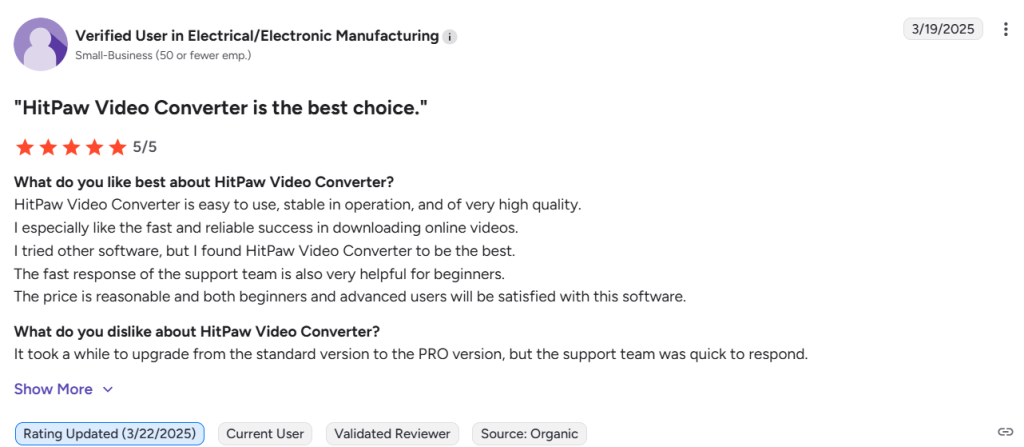
HitPaw reviews are mixed across public review sources because the brand covers multiple tools, products, licenses, and purchase paths. G2 lists HitPaw Ltd. at 4.8 out of 5 from 22 verified reviews, while Capterra product pages for HitPaw Video Enhancer show positive review themes around ease of use, video quality improvement, AI upscaling, and customer support.
Trustpilot includes both positive product and support feedback and negative refund or renewal complaints, so buyers should treat Trustpilot as a support risk signal rather than a clean product rating for one specific HitPaw tool. Public review signals are more useful when matched to the exact product being purchased, such as VikPea, Univd, FotorPea, VoicePea, Edimakor, or HitPaw Online.
Alternatives of HitPaw
HitPaw alternatives include AI video enhancers, online video editors, photo editors, audio editors, and creator platforms for users comparing media enhancement, editing depth, file conversion, and social publishing workflows.
- Topaz Video, best for creators and professionals that need AI video upscaling, denoising, restoration, stabilization, slow motion, and frame interpolation.
Choose it when advanced video enhancement quality matters more than HitPaw’s broader video, photo, audio, and online tool suite. - Wondershare Filmora, best for creators that need AI video editing, effects, object removal, background cutout, video enhancement, templates, and text tools.
Choose it when full video editing depth matters more than buying separate HitPaw tools for enhancement, conversion, voice, and editing workflows. - Adobe Express, best for teams that need AI assisted image editing, video creation, branded designs, templates, and content production in one browser based workspace.
Choose it when brand content, visual design, social assets, and Adobe ecosystem fit matter more than HitPaw’s specialist media utility tools. - CapCut, best for social creators that need AI video editing, smart templates, auto captions, text to speech, background removal, and platform ready short form content.
Choose it when TikTok, YouTube, Instagram, and mobile first editing workflows matter more than desktop media conversion or AI video enhancement. - VEED, best for marketers and solopreneurs that need AI video generation, subtitles, dubbing, avatars, background noise removal, and browser based video editing.
Choose it when online video creation, AI captions, audio cleanup, and team friendly publishing workflows matter more than desktop software licenses. - Descript, best for podcasters, video creators, educators, and teams that need text based video editing, transcription, captions, screen recording, and audio cleanup.
Choose it when spoken content, podcast editing, filler word removal, voice enhancement, and transcript based editing matter more than video upscaling or photo tools. - Canva, best for creators and small teams that need photo editing, video editing, AI design tools, templates, brand kits, social posts, and quick visual content production.
Choose it when design flexibility, social creative production, and simple AI photo or video editing matter more than HitPaw’s product specific desktop utilities.