

What Is Xtensio?
Xtensio is a living deliverables workspace for creating, branding, sharing, tracking, and reusing business documents, so xtensio coupon intent should be framed around verified pricing rather than assumed checkout deals. Xtensio lets teams create professional documents from templates, share them as live links, and reuse them across clients and projects.
Xtensio supports documents such as proposals, reports, personas, strategy documents, pitch decks, one pagers, business plans, investor updates, campaign briefs, competitive analyses, and roadmaps. Its strongest fit is teams that need client ready deliverables, branded sharing, PDF exports, engagement analytics, and reusable workspaces.
Who It Is For
Xtensio is for consultants, agencies, startups, founders, marketers, sales teams, product teams, UX teams, educators, and small businesses that create repeatable business deliverables. Xtensio’s official product page names consultancies, agencies, startups, founders, marketing teams, sales teams, and product teams as core user groups.
Best Use Case
Xtensio is best used for client ready documents that need templates, branding, live sharing, exports, and reusable structure. Strong use cases include proposals, pitch decks, reports, personas, business plans, strategy documents, investor updates, campaign briefs, competitive analyses, and client portals.
Standout Value
Xtensio’s standout value is its live document workflow, where shared links stay current after edits. Recipients can view a polished page without downloads or login, while teams can update the original document and keep the shared version current.
Setup Time and Support
Xtensio has a low friction setup path because its Free Forever plan lists no credit card requirement and includes 5 deliverables. The pricing page also lists paid plans for unbranded sharing, PDF and PNG exports, engagement analytics, domains, guest access, team roles, and project workspaces.
Why Xtensio Stands Out
Xtensio stands out because it combines document creation, live sharing, branded delivery, engagement analytics, templates, project workspaces, and client facing exports in one workspace. The product is more focused on repeatable business deliverables than general design tools, which makes it relevant for buyers comparing xtensio pricing, xtensio alternatives, and xtensio discount options before subscribing.
Key Features
Xtensio’s key features focus on creating, branding, sharing, tracking, exporting, and reusing live business deliverables.
| Feature | What it does | Why it matters |
| 180+ templates | Provides editable templates for personas, pitch decks, reports, proposals, marketing plans, sales documents, UX assets, and strategy documents. | Helps teams start from structured business formats instead of a blank page. |
| AI document creation | Generates structured starting points for deliverables from user prompts. | Speeds up the first draft for client documents, internal briefs, and business assets. |
| Live link sharing | Creates shareable live links that update automatically after edits. | Keeps proposals, reports, pitch decks, and strategy documents current without resending files. |
| Workspaces | Organizes work by client, project, team, or stakeholder group. | Keeps repeatable work structured across agencies, consultants, startups, and product teams. |
| Brand controls | Applies domains, logos, fonts, colors, and custom shared links across deliverables. | Helps teams maintain consistent client ready presentation without redesigning every file. |
| Engagement analytics | Tracks who opened a deliverable, how long they read, and which sections got attention. | Helps sales teams, agencies, marketers, and founders follow up based on reader behavior. |
| Collaboration and access control | Supports guests, team roles, permissions, project workspaces, and folder level guest access on eligible plans. | Gives teams more control over internal contributors, clients, and shared deliverables. |
| PDF and PNG exports | Lets users download deliverables, sections, canvases, or modules as PDF or PNG files. | Supports buyers that need both live pages and static client ready files. |
Xtensio Top Integrations
Xtensio Top Integrations are mainly embed based integrations for adding videos, maps, forms, social content, design files, presentations, and public web content into Xtensio folios.
- YouTube, embeds videos directly into Xtensio folios for proposals, reports, pitch decks, and training documents.
- Wistia, embeds polished video content with built in analytics inside client facing folios and presentations.
- Canva, embeds Canva designs inside Xtensio folios for visual assets, branded layouts, and presentation content.
- Google Maps, embeds interactive maps for location pages, event documents, real estate briefs, and client reports.
- Google Sheets, embeds spreadsheets so teams can show live tables, trackers, plans, and data inside business deliverables.
- Google Forms, embeds forms for collecting responses, lead details, feedback, and project information inside a folio.
- Figma, embeds designs and prototypes for UX documents, product briefs, creative reviews, and client presentations.
- Miro, embeds Miro boards so teams can include workshops, diagrams, strategy maps, and planning boards in Xtensio deliverables.
Pros and Cons of Xtensio
Xtensio’s main buying tradeoff is strong live deliverable workflow and branded sharing, with limits around advanced design flexibility and plan based access controls.
| Pros | Cons |
| Generous Free Tier: Includes 5 deliverables, 100 AI credits, and 1 project workspace with no credit card requirement. | Free Plan Constraints: Restricts users to branded link sharing and enforces a strict 5-deliverable limit. |
| Dynamic Live Links: Links stay current even after edits, so teams don’t have to resend updated PDFs or proposals. | Analytics Dependency: Engagement tracking depends entirely on live link sharing and doesn’t work for downloaded PDFs. |
| Extensive Template Library: Features 180+ templates covering marketing, sales, UX, strategy, and various business reports. | Limited Design Customization: Teams needing highly advanced graphic design tools may still prefer dedicated design platforms. |
| In-Depth Engagement Insights: Shows who opened a deliverable, how long they read it, and which specific sections got attention. | Tiered Feature Gating: Advanced analytics, password protection, and custom domains are locked behind higher-tier plans. |
| Plus Plan Benefits: Removing the Xtensio watermark and providing unlimited PDF and PNG exports adds professional polish. | Complex Access Controls: Folder-level access and guest account permissions vary by plan, requiring careful comparison before upgrading. |
Pricing Plans
The information may change. For the most accurate, up to date, and full feature breakdowns, please visit the official Xtensio website.
| Plan name | Price | What it includes |
| Free Forever | $0 per seat per month | 5 deliverables, 100 AI credits, 1 project workspace, branded link sharing and embedding, 3 day revision history, 100MB image storage, and no credit card requirement. |
| Plus | $10 per seat per month, paid yearly, or $12 paid monthly | Everything in Free, plus unlimited deliverables, watermark removal, unlimited PDF and PNG exports, 3 guest accounts, unlimited project workspaces, 90 day revision history, 500 AI credits per month, and team roles. |
| Pro | $20 per seat per month, paid yearly, or $25 paid monthly | Everything in Plus, plus engagement analytics, logo and font branding, password protected links, custom links, 3 connected domains, unlimited guest accounts, folder level guest access, unlimited AI credits, and 365 day revision history. |
| Unlimited | $80 per month, paid yearly, or $100 paid monthly | Everything in Pro, plus 10 members, unlimited guests, unlimited connected domains, unlimited revision history, and unlimited image storage. Extra members are listed at $20 per month. |
Xtensio does not show a public xtensio coupon code or xtensio discount coupon on the official pricing page reviewed. The main visible xtensio discount is annual billing, where Xtensio states buyers can save up to 20% with yearly billing.
Reviews
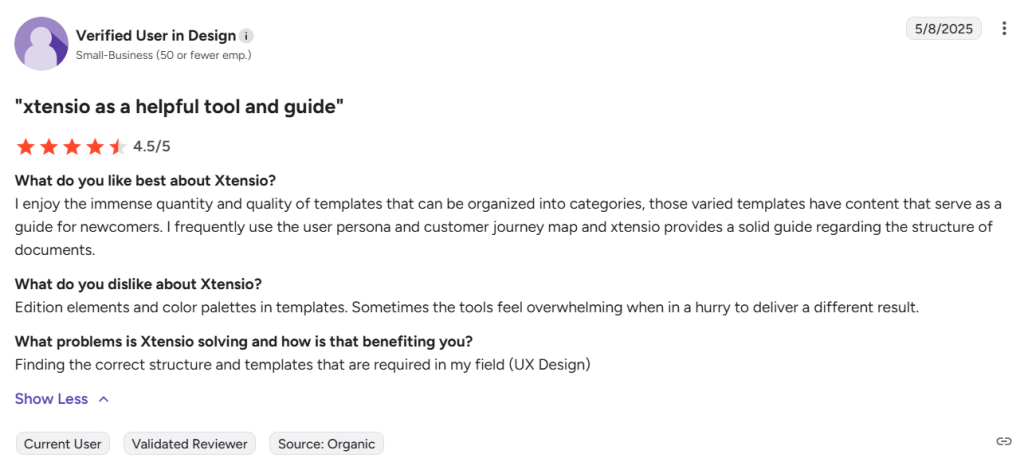
Xtensio reviews are positive on G2, with a 4.5 out of 5 rating from 275 reviews at the time reviewed. Review themes focus on templates, ease of use, business presentations, persona documents, collaboration, and fast document creation. Buyers should also note recurring limitations around free plan functionality, customization, template limits, design options, and cost.
Alternatives of Xtensio
Xtensio alternatives include design platforms, presentation tools, workspace apps, whiteboarding software, and proposal platforms that help teams create business documents, decks, reports, and client facing deliverables.
- Canva, best for teams that need a broad design platform for presentations, business templates, documents, proposals, reports, and branded visual content.
Choose it when design flexibility, template volume, social graphics, visual documents, and presentation assets matter more than Xtensio’s live deliverable workspace. - Visme, best for marketers, educators, and business teams that need presentations, infographics, charts, documents, videos, and branded visual content in one platform.
Choose it when visual storytelling, interactive content, infographics, and data presentation are stronger requirements than structured business folios. - Beautiful.ai, best for sales and marketing teams that need AI assisted presentation creation with polished slide layouts and on brand deck workflows.
Choose it when presentation quality, slide automation, and fast deck creation matter more than reports, portals, personas, and mixed business documents. - Pitch, best for fast moving teams that need collaborative presentation software for creating, sharing, delivering, and analyzing branded slide decks.
Choose it when team deck collaboration and presentation analytics are more important than template based document workspaces. - Notion, best for teams that need a connected workspace for docs, wikis, projects, knowledge bases, enterprise search, and internal collaboration.
Choose it when internal knowledge management, project documentation, and team workspace structure matter more than polished external deliverables. - Miro, best for teams that need collaborative whiteboards, diagrams, workshops, planning boards, and visual collaboration.
Choose it when brainstorming, mapping, diagramming, and workshop collaboration matter more than client ready reports and proposal style folios. - PandaDoc, best for sales teams that need proposal creation, document tracking, approvals, and electronic signatures in one workflow.
Choose it when proposals, contracts, approvals, CRM connected workflows, and eSignatures matter more than general business templates and live branded pages.


