

What Is DataSnipper?
datasnipper coupon is a common search from buyers who want to lower the cost of an audit and finance automation platform before they subscribe. DataSnipper is an Excel native intelligent automation platform built for audit and finance teams that need to collect, extract, cross reference, match, validate, and review supporting evidence inside Excel rather than in a separate workspace.
Its current product positioning is focused on audit and finance workflows, not general document automation. DataSnipper’s public platform pages highlight collect, extract, match, analyze, AI powered document extraction, Excel Online support, and AI powered PBC collection through UpLink, which makes it relevant for teams comparing datasnipper pricing and datasnipper alternatives across audit, testing, and review workflows.
Who It Is For
It fits audit teams, finance teams, internal audit functions, controllers, and accounting professionals that work heavily in Excel and need faster evidence collection, testing, and review workflows.
Best Use Case
It works best for Excel based audit and finance procedures where teams need to collect supporting documents, extract structured or unstructured data, reconcile evidence, and maintain traceable review documentation.
Standout Value
Its standout value is Excel native automation, because DataSnipper keeps source document review, extraction, and validation inside the spreadsheet environment teams already use every day.
Setup Time and Support
Setup is sales led rather than self serve. DataSnipper’s public site routes buyers through a demo process, which suggests onboarding is structured around team needs instead of instant checkout.
Why DataSnipper Stands Out
It stands out because it is built specifically for audit and finance work inside Excel, with AI layered into collection, extraction, matching, and analysis instead of treating audit evidence review as a generic document task.
Key Features
DataSnipper’s key features combine Excel native evidence collection, AI extraction, reconciliation, review, reporting, and AI powered PBC workflows in one audit and finance platform. Its current product pages position it as a workflow system for collect, extract, match, and analyze steps rather than a simple Excel add in.
Feature | What it does | Why it matters |
Collect | Centralizes documentation and kicks off compliant collaboration workflows. | Reduces document chaos at the start of audit and finance work. |
Extract | Pulls data from documents, tables, forms, and webpages directly into Excel. | Saves time on manual copy and paste and improves traceability. |
AI Extractions | Uses contextual AI to extract data from unstructured documents with prompts or reusable templates. | Helps teams work with documents that do not fit fixed layouts. |
Match | Automates reconciliation by linking Excel data to source documents with full traceability. | Makes testing and evidence matching faster and more standardized. |
Analyze | Supports review with AI suggested answers, sum checks, and clearer visibility into conclusions. | Improves review quality and speeds up judgement based work. |
UpLink | Centralizes document requests, uploads, AI pre validation, and approval workflows. | Cuts client chasing and streamlines PBC collection. |
Excel Online support | Extends core workflows into browser based Excel environments. | Helps hybrid teams work in cloud based Excel setups. |
Dashboard and Reporting | Tracks adoption, access, and impact across the organization. | Gives managers better visibility into ROI and usage. |
These capabilities are described across DataSnipper’s current platform, extract, AI, and UpLink pages.
DataSnipper Top Integrations
DataSnipper’s strongest integrations are centered on Microsoft Excel, browser based Excel workflows, document collection, and cloud connected file environments rather than a broad native app marketplace. Its current platform pages position DataSnipper as an Excel native automation layer for audit and finance teams, with browser access, AI powered document collection, and Microsoft backed AI workflows.
- Microsoft Excel Desktop: Run DataSnipper directly inside Excel to extract, cross reference, validate, and review source documents without leaving the workbook.
- Excel Online: Use DataSnipper in the browser for shared workpapers, cloud saved source documents, and smoother online collaboration across teams.
- Office 365: Access DataSnipper Excel Online through an Office 365 account so users can work in browser based Excel environments with the same core workflow.
- Microsoft Azure: Power AI Extractions through Microsoft backed AI infrastructure so unstructured documents can be interpreted and converted into traceable Excel ready data faster.
- UpLink: Centralize document requests, uploads, AI pre validation, and approval inside a secure PBC workflow.
- Mapped drives and cloud saved workbooks: Track DataSnipper usage and linked documents across workbook environments more easily.
Pros and Cons of DataSnipper
DataSnipper is strong for Excel native audit and finance automation, but it is less suited to buyers who want transparent self serve pricing, a broad native app marketplace, or workflows outside Excel centric review work. Its current product pages position it as an intelligent automation platform for collect, extract, match, and analyze workflows inside Excel, with AI modules layered on top.
Pros | Cons |
Excel Native Workflow: Built directly into Excel for extraction, validation, and review, eliminating the need to switch to a separate workspace. | Opaque Pricing Model: Public pricing is sales-led rather than transparent, making it difficult for smaller buyers to compare costs quickly. |
Audit-Specific Focus: Tailored specifically for evidence validation, reconciliation, and PBC collection, unlike generic document automation tools. | Excel Dependency: Because it is tightly integrated with Excel, teams that don’t rely heavily on spreadsheets may find limited utility. |
AI-Powered Extractions: Handles unstructured documents through prompts or reusable templates, moving beyond rigid, fixed layouts. | Narrow Ecosystem: The integration layer is focused mainly on Excel and cloud storage rather than a broad, multi-app marketplace. |
Secure Data Collection: UpLink streamlines document collection with secure requests, AI pre-validation, and automatic document splitting. | Change Management Needs: Advanced AI capabilities may require significant process redesign and staff training to capture full value. |
Cloud & Hybrid Flexibility: Support for Excel Online provides flexibility for hybrid teams and documents saved in the cloud. | Heavier Evaluation Path: The enterprise-level focus means a more complex evaluation process compared to lightweight utility tools. |
The pricing limitation is grounded in DataSnipper’s demo led buying motion. The workflow fit and change management points are reasoned from the product’s Excel first and AI heavy platform positioning.
DataSnipper Pricing Plans
Verify pricing on the official website. The information may change. For the most accurate, up to date, and full feature breakdowns, please visit the official DataSnipper website. DataSnipper’s current website uses a book demo and sales led buying flow instead of showing a public self serve pricing table, so exact live prices are not publicly listed on the main commercial pages I could verify.
Plan | Price | What it includes |
Basic | Custom pricing | Official package materials reference a Basic package for smaller teams with essential automation and documentation tools. The current live site does not publish a public price. |
Professional | Custom pricing | Official package materials reference a Professional package for broader platform use and more workflow flexibility. The current live site still routes buyers through sales rather than checkout. |
Enterprise | Custom pricing | Enterprise is the highest verified package name in public materials and is positioned for larger organizations that need broader capabilities, reporting, and scale. |
DataSnipper also appears to use subscription based licensing, because its knowledge base includes activation guidance for subscription based licenses and user managed license administration through the DataSnipper Dashboard. That supports the view that the commercial model is negotiated and account based rather than a simple online checkout flow.
The safest way to find a valid datasnipper coupon, datasnipper discount coupon, datasnipper discount, or datasnipper coupon code is to check the official website and commercial team directly. I did not find a broad public coupon code system or public discounted checkout flow on DataSnipper’s current official pages.
DataSnipper Reviews
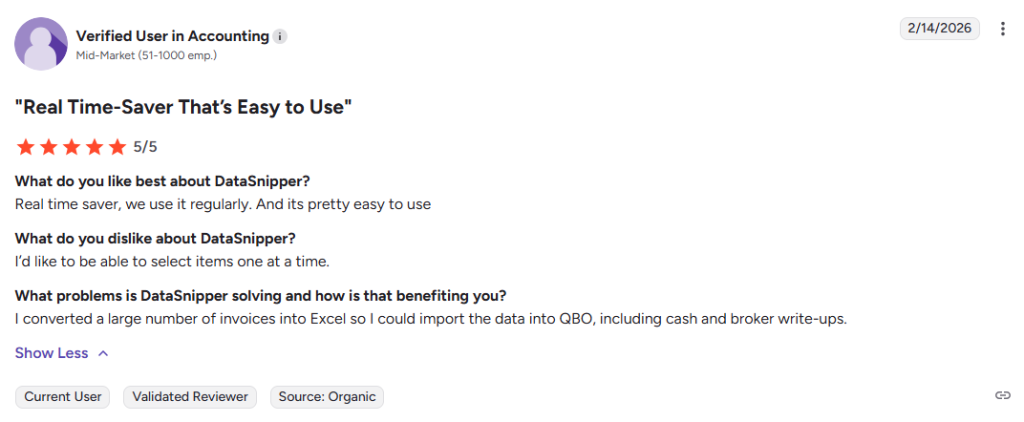
Public DataSnipper reviews are generally very positive overall. G2 currently shows DataSnipper at 4.8 out of 5 from 220 reviews, while Capterra shows 4.7 out of 5 from 130 reviews.
Review themes commonly mention time savings, easier documentation, smoother audit evidence review, and user friendly Excel based workflows as strengths, while recurring drawbacks include Excel plugin glitches, heavier files after snipping, formatting annoyances, and limitations with some document formats.
DataSnipper Alternatives
- Caseware is best for firms that want an end to end audit platform spanning planning, fieldwork, reporting, and AI powered audit workflows. Choose it when a connected audit system matters more than DataSnipper’s Excel first evidence review workflow.
- Caseware IDEA is best for audit and accounting teams that need strong audit analytics, anomaly detection, full population testing, and broad data imports. Choose it when audit data analysis matters more than document snipping and workbook evidence tracing.
- AuditBoard is best for enterprise audit, risk, and compliance teams that want a connected GRC platform with AI, analytics, and cross functional collaboration. Choose it when broader audit, risk, and compliance visibility matters more than Excel native testing workflows.
- Diligent HighBond is best for internal audit teams that want automated workflows, analytics, remediation management, and continuous assurance inside a wider GRC platform. Choose it when audit management and governance workflows matter more than Excel based document extraction.
- Workiva is best for audit teams that need audit management, linked documents, dashboards, and analytics inside a cloud collaboration platform. Choose it when connected audit management and reporting matter more than DataSnipper’s evidence matching inside Excel.
- FloQast is best for accounting and compliance teams that want automated evidence collection, embedded controls, and audit ready workflows tied to the close process. Choose it when evidence collection and compliance automation matter more than Excel native audit testing.
- MindBridge is best for finance, audit, and accounting teams that want AI driven financial oversight, anomaly detection, and continuous assurance across large transaction sets. Choose it when AI based risk detection matters more than source document review inside spreadsheets.


