SHORT SUMMARY
- See why an AI website builder launches a site in 2 to 15 minutes, versus 2 to 8 hours or more with a traditional builder.
- Compare real 1-year and 3-year costs across AI builders, Wix Editor, Squarespace, and WordPress.
- Get a 3-condition checklist to confirm whether your project fits an AI builder or needs a traditional one.
- Find the right builder for your business, whether you run a small service business, an agency, or a large online store.
- Learn where AI builders fall short on design control, e-commerce scale, and team collaboration before you commit.
What Is an AI Website Builder?
An AI website builder is a software tool that uses artificial intelligence to generate a complete website from a text prompt or a short questionnaire. The tool analyzes user inputs, such as business type, industry, and design preferences, then automatically creates layout, copy, images, and navigation structure.
AI website builders rely on machine learning models trained on millions of existing websites. These models identify design patterns, generate copy that matches the described business, and assemble pages without manual drag-and-drop editing. Popular AI website builders include B12, Wix AI, Hostinger AI, Framer AI, Durable, and 10Web.
There are 5 core functions of an AI website builder:
- Generate page layout based on business type
- Write website copy, including headlines and product descriptions
- Select images and color schemes automatically
- Apply mobile-responsive design by default
- Inject basic SEO elements, such as meta titles and sitemaps
Most AI website builders complete this process in 2 to 15 minutes. After generation, users can refine the site through chat commands or a visual editor, depending on the platform.
What Is a Traditional Website Builder?
A traditional website builder is a software tool that provides templates and a drag-and-drop editor for manually constructing a website. The user selects a template, then adds pages, sections, images, and text one element at a time.
Traditional website builders require the user to make every design decision directly. This includes choosing fonts, arranging layout blocks, writing all copy, and configuring plugins or apps for added functionality. Popular traditional website builders include WordPress, Wix Editor, Squarespace, and Webflow.
There are 4 core components of a traditional website builder:
- A library of pre-designed templates
- A visual editor for arranging sections and elements
- Manual content input for text and images
- An app or plugin marketplace for extended features, such as booking systems and e-commerce
Building a website with a traditional builder takes 2 to 8 hours for a basic site, and 15 to 30 hours for a more customized project. WordPress, unlike hosted builders such as Wix Editor and Squarespace, also requires separate steps for hosting setup, theme installation, and plugin configuration.
AI Website Builder vs Traditional Website Builder: Key Differences
Speed and Launch Time
An AI website builder creates a complete website in 2 to 15 minutes. A traditional website builder takes 2 to 8 hours for a basic 3-page site, and 15 to 30 hours for a fully customized site.
WordPress takes even longer. It needs extra setup time for hosting, theme installation, and plugin configuration before any design work starts. A first-time WordPress user typically spends 8 or more hours reaching a finished, professional-looking site.
Where AI saves the most time:
| Stage | AI Website Builder | Traditional Website Builder |
| Page structure | Generated instantly | Chosen and built manually |
| Website copy | Written automatically | Written by the user |
| Design choices | Applied automatically | Selected one by one |
Traditional builders stay faster in only one case: copying an exact, pre-approved design, such as a Figma file. Here, AI generation adds an extra editing step instead of removing one.
Cost
An AI website builder typically costs $5 to $20 per page, often as a one-time fee. A traditional website builder like Wix Editor or Squarespace charges a monthly subscription of $13 to $49, whether or not the site changes.
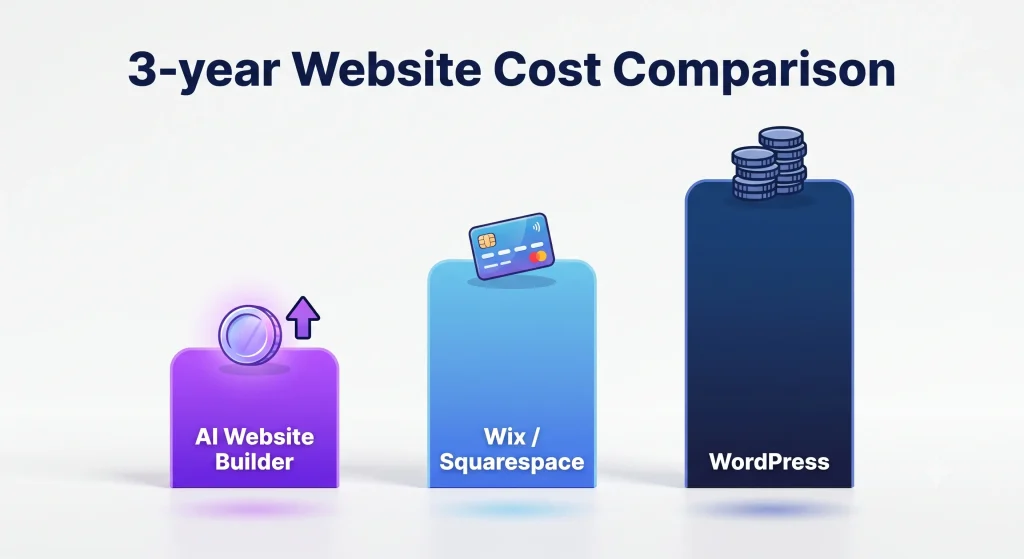
Year 1 cost:
| Builder Type | Cost |
| AI website builder | $15–$60 |
| Wix Editor/ Squarespace | $156–$588 |
| WordPress | $60–$500+ |
3-year cost:
| Builder Type | Cost |
| AI website builder | Stays close to the one-time fee |
| Wix Editor/ Squarespace | $468–$1,764 |
| WordPress | $900–$1,500 |
This cost gap widens further with add-on software. Traditional builders require separate subscriptions for scheduling, email marketing, and client management. AI builders like B12 bundle these tools in, cutting 2 to 3 subscriptions and lowering the effective 3-year cost for consultants, law firms, accountants, and agencies.
Want to learn more about B12? Read our detailed B12 AI Website Builder Review to explore its features, pricing, pros, cons, and ideal use cases before making your decision.
Design Control and Customization
A traditional website builder gives full manual control over every font, spacing value, and layout element. An AI website builder generates a starting design automatically, then lets you refine it through chat commands or a visual editor.
Choose based on your need:
- Pick a traditional builder if you need to match an exact brand guideline or Figma design
- Pick an AI builder if a fast, professional result matters more than controlling every detail
Modern AI builders close this gap through simple chat edits. Typing “use a warmer color palette” or “make the hero image more rustic” updates the whole site at once, instead of requiring you to search for the setting yourself.
Content Creation and Copywriting
An AI website builder writes your website copy automatically, including headlines, service descriptions, and calls to action. A traditional website builder leaves every content field blank, so you write all the text yourself.
3 things AI writes for you:
- Homepage headlines and hero text
- Service or product descriptions
- About page and contact page copy
This helps most if you know your business but struggle to describe it in marketing language. You edit the AI’s draft instead of starting from a blank page. Traditional builders offer no such help unless you hire a copywriter or add a separate AI writing plugin.
SEO and Technical Setup
An AI website builder adds core SEO elements automatically the moment it generates your site. This includes meta titles, meta descriptions, schema markup, sitemaps, and canonical URLs.
Traditional builders vary by platform:
| Platform | SEO Setup |
| Wix Editor/ Squarespace | Basic setup automatic; meta descriptions and structured data need manual entry |
| WordPress | No built-in SEO; requires a plugin like Yoast or RankMath, set up by hand |
Page speed affects your search ranking directly, since Google uses Core Web Vitals as a ranking signal. AI-generated sites tend to use lightweight code with minimal JavaScript, which loads faster than platforms running heavier editor frameworks.
Maintenance and Security
An AI website builder handles maintenance for you. Security patches, infrastructure updates, and uptime monitoring happen automatically.
A self-hosted platform like WordPress puts this work on you. WordPress site owners must:
- Update the WordPress core software
- Update every plugin
- Update the active theme
- Watch for security vulnerabilities
- Fix conflicts when an update breaks a plugin or theme
Hosted traditional builders like Wix Editor and Squarespace handle server security automatically, similar to AI builders. But you still update your own design elements, apps, and integrations by hand.
Scalability
Scalability comes down to 3 things: traffic, team size, and product catalog size.
| Factor | AI Website Builder | Traditional Website Builder |
| Traffic spikes | Handled automatically | Wix Editor/Squarespace: automatic. WordPress: needs manual hosting setup |
| Team workflows | Built for single users or small teams | WordPress and Webflow support multi-author teams with permissions |
| Product catalog | Good for 5–50 products | WooCommerce/Shopify handle hundreds of products, shipping, and tax rules |
Code Ownership and Platform Lock-In
Code ownership decides whether you can move your website to a new host without rebuilding it from scratch.
3 ownership models:
| Model | Example | What Happens If You Leave |
| Locked-in hosted platform | Wix Editor, Squarespace | Site stays on the platform; you rebuild elsewhere |
| Self-hosted | WordPress | You own the code and files; move hosts anytime |
| AI builder with export | Varies by platform | Some let you export HTML/CSS; others lock you in |
Before picking an AI website builder, check whether it lets you export your full code. This decides whether a future move to WordPress means a simple migration or a full rebuild.
AI Website Builder vs Traditional Website Builder at a Glance
| Feature | AI Website Builder | Traditional Website Builder |
| Setup time | Minutes | Hours or days |
| Ease of use | Excellent for beginners | Better for experienced users |
| Customization | Moderate | Extensive |
| SEO | Built in basics | More advanced control |
| Maintenance | Minimal | Requires ongoing updates |
| Scalability | Small to medium websites | Small to enterprise websites |
| Best for | Small businesses, freelancers | Growing businesses, agencies |
When to Use an AI Website Builder
An AI website builder works best for simple to medium-complexity websites that need to launch fast with minimal manual design work.
Best-Fit Use Cases
- Small business websites with 10 pages or fewer, such as a homepage, services page, about page, and contact page
- Portfolio and personal websites for freelancers, photographers, and consultants showcasing work samples
- Basic e-commerce stores selling 5 to 50 products with simple checkout, such as a bakery, boutique, or service-based shop
- Landing pages built for a single campaign, product launch, or lead-generation offer
- Blogs with fewer than 50 posts, where content volume does not yet require advanced editorial workflows
- Restaurant and appointment-based business sites needing a menu, booking form, or contact page without custom backend logic
- Time-sensitive projects, such as a website needed within 24 to 48 hours for a client pitch or event
3 conditions that confirm an AI website builder is the right fit:
- The project needs fewer than 10 pages
- The product catalog stays under 50 items
- No custom backend logic, membership system, or complex integration is required
Platforms like B12 are especially useful for consultants, agencies, law firms, accountants, and other professional service businesses because they combine AI website creation with built in business tools such as appointment scheduling, contact management, and email marketing.
When to Use a Traditional Website Builder
A traditional website builder works best for complex, large-scale, or highly customized websites that need deep control over design, functionality, and content management.
Best-Fit Use Cases
- Large content sites and news publications with 500 or more blog posts, requiring categories, tags, search, and editorial workflows
- Complex e-commerce stores selling 100 or more products, with inventory tracking, multiple shipping zones, and tax rules across regions
- Membership and course platforms requiring gated content, user accounts, and payment tiers
- Multi-author team sites with 5 or more contributors needing role-based permissions, such as editor, author, and admin access
- Custom web applications, such as booking systems, client portals, or dashboards built around specific business logic
- Sites requiring pixel-perfect brand replication, such as an exact Figma design with custom animations and interactions
- High-traffic enterprise sites needing dedicated hosting, custom infrastructure, and direct code-level performance tuning
- Projects with a dedicated developer or agency on staff to build, extend, and maintain the site long-term
3 conditions that confirm a traditional website builder is the right fit:
- The project needs 500 or more content pages, or a product catalog exceeding 100 items
- The site requires custom functionality beyond a contact form or basic checkout, such as booking, membership, or CRM integration
- A developer, agency, or in-house team is available to build and maintain the site
A traditional website builder, especially WordPress with WooCommerce or another dedicated e-commerce platform, gives you the plugins and manual control that complex projects need, if your project meets any one of these 3 conditions.
Advantages of AI Website Builders
AI website builders make it easier to create a professional website without spending hours on design or setup. They are a practical choice for freelancers, startups, and small businesses that want to get online quickly.
- Launch your website faster: Most AI website builders can generate a complete website in 2 to 15 minutes instead of several hours.
- Lower initial costs: AI builders typically cost $5 to $20 per page, making them a good option for businesses with a limited budget.
- Create content automatically: They can generate headlines, page content, and calls to action, giving you a strong starting point instead of a blank page.
- Built in SEO features: Most platforms automatically add basic SEO elements such as meta titles, meta descriptions, XML sitemaps, and mobile friendly layouts.
- Minimal maintenance: Hosting, security updates, and software maintenance are handled by the platform, so you can focus on running your business.
For simple websites and growing businesses, these advantages make AI website builders one of the fastest ways to establish an online presence.
Limitations of AI Website Builders
AI website builders are convenient, but they are not the right solution for every project. As your website becomes more complex, their limitations become easier to notice.
- Less design flexibility: You can customize the generated design, but achieving a completely unique layout is often more difficult than with traditional builders.
- Limited support for large online stores: Most AI builders work well for small catalogs, but stores selling 100+ products often need more advanced inventory and shipping features.
- Fewer collaboration tools: They are designed mainly for individuals and small teams rather than businesses with multiple editors and developers.
- Possible platform lock in: Some platforms do not allow you to export your entire website, making future migrations more difficult.
If your website requires advanced functionality, custom development, or enterprise level scalability, a traditional website builder may be a better long term choice.
Advantages of Traditional Website Builders
Traditional website builders provide greater flexibility and control, making them a strong choice for businesses with complex requirements.
- Complete design freedom: You can customize every part of your website, from layouts and typography to animations and interactive elements.
- Better support for large online stores: Platforms such as WordPress with WooCommerce and Shopify can manage large product catalogs, multiple payment methods, and advanced shipping options.
- Designed for teams: Multiple users can work on the same website with different roles and permissions.
- Greater ownership: Self hosted platforms like WordPress give you full control over your website, files, and hosting environment.
- Extensive plugin ecosystem: Thousands of plugins and integrations let you add booking systems, CRM software, membership features, and almost any other functionality.
These benefits make traditional website builders the preferred option for businesses planning to grow their websites over time.
Limitations of Traditional Website Builders
Traditional website builders offer more flexibility, but they also require more time, effort, and ongoing management.
- Longer setup process: Building a professional website usually takes several hours or even days, depending on the level of customization.
- Higher long term costs: Hosting, premium themes, plugins, and maintenance can increase the total cost over time.
- More maintenance responsibilities: Self hosted websites require regular updates, security checks, backups, and plugin management.
- Steeper learning curve: New users often need time to learn how themes, plugins, and page builders work before they can build a polished website.
For businesses with experienced teams or long term growth plans, these trade offs are often worth the extra flexibility and control.
The Hybrid Approach: Combining AI and Traditional Tools
A hybrid approach combines the speed of an AI website builder with the flexibility of manual customization. You can create the first version of your website with a platform like B12, then refine the design, content, and SEO settings as your business grows. This approach saves time without limiting future improvements.
The process is simple:
- Generate the first version with an AI website builder.
- Refine the layout, colors, and branding manually.
- Replace AI-generated copy with original content where needed.
- Add integrations, custom features, and advanced SEO settings before publishing.
This approach works well for small businesses, startups, agencies, and freelancers. It shortens development time while giving you the flexibility to grow your website as your business evolves.
How to Choose: A Decision Framework
Choosing between an AI website builder and a traditional website builder comes down to your goals. Answer these seven questions to find the right fit.
Quick Decision Guide
| Choose an AI Website Builder if… | Choose a Traditional Website Builder if… |
| You need a website quickly. | You need full design flexibility. |
| You have little or no technical experience. | You have design or development experience. |
| Your website has fewer than 10 pages or 50 products. | Your website will grow into a large content or e-commerce site. |
| You want the easiest setup and maintenance. | You need custom functionality and integrations. |
| You prefer speed and simplicity. | You want complete ownership and scalability. |
1. How fast do you need your website?
An AI website builder launches in 2 to 15 minutes. A traditional website builder takes 2 to 8 hours for a basic site, longer for custom design. Choose AI if you need a live site today; choose traditional if the timeline allows for iteration.
2. How large will your website be?
The number of pages, products, and future content can influence which type of website builder is the better long-term choice.
3. Do you need complete design control?
AI saves hours of work, if you’re happy with a professional design that only needs small edits.
Choose a traditional website builder to match strict brand guidelines, include custom animations, or follow an exact Figma design.
4. What’s your experience level?
AI website builders are designed for beginners. They handle most of the design and setup automatically.
Traditional website builders are better suited for users who are comfortable editing layouts, installing plugins, or working with developers.
5. What’s your budget?
An AI website builder provides the quickest and most affordable way to get online, if keeping costs low is your priority.
A traditional website builder costs more over time but offers greater flexibility as your website grows.
6. Will your website grow in the future?
Think beyond today’s requirements.
A traditional website builder scales more easily for hundreds of blog posts, a membership site, or a large online store, if that’s your growth path.
For small business websites, portfolios, landing pages, and simple online stores, an AI website builder is usually enough.
7. Do you want convenience or complete ownership?
AI website builders are built for convenience. They manage hosting, updates, and security, so you can focus on your business.
Traditional builders, especially WordPress, give you complete control over your website, files, and hosting, making them a better choice if long-term ownership is important.
Best AI Website Builders in 2026
Every AI website builder is designed for a different type of user. Some prioritize speed and simplicity, while others focus on customization, business management, or design flexibility. If an AI website builder is the right fit for your project, these are some of the best platforms to consider in 2026.
| AI Website Builder | Best For | Key Strength |
| B12 | Professional service businesses | Combines AI website creation with scheduling, client management, email marketing, and built in business tools |
| Wix AI | Small businesses | Easy to use website builder with AI design, SEO tools, and e-commerce features |
| Hostinger AI Website Builder | Beginners | Affordable plans, AI content generation, and fast website setup |
| Framer AI | Designers and startups | Modern website designs with advanced customization and responsive layouts |
| Durable | Local businesses | Generates a complete business website in minutes with AI powered business tools |
| 10Web AI Builder | WordPress users | Creates AI powered WordPress websites while maintaining WordPress flexibility |
| Squarespace Blueprint AI | Creatives and portfolios | AI assisted website setup with professionally designed templates |
Each platform has different strengths, pricing, customization options, and AI capabilities. The best choice depends on your budget, technical experience, and the type of website you plan to build.
Want a detailed comparison? We’ve tested and compared the leading AI website builders based on features, pricing, ease of use, customization, SEO, and overall value. Read our complete guide to the Best AI Website Builders in 2026 to find the right platform for your needs.