What Is Buffer?
Buffer is a social media management platform for planning, creating, scheduling, publishing, analyzing, and engaging with social media content across multiple channels. Buyers searching for buffer coupon are usually comparing Buffer pricing, discount options, coupon code availability, supported channels, reviews, and alternatives before choosing a social media scheduling tool.
Buffer supports publishing workflows for Facebook, Instagram, TikTok, LinkedIn, Threads, Bluesky, YouTube Shorts, Pinterest, Google Business Profile, Mastodon, and X. Its official site positions the product around Publish, Create, Community, Analyze, Collaborate, and AI Assistant workflows.
Who It Is For
Buffer is for creators, small businesses, agencies, nonprofits, higher education teams, marketers, and social media teams that need one workspace for content planning and publishing. Buffer’s official site lists creator, small business, agency, nonprofit, and higher education use cases, which makes the product relevant for solo content operators and team based social media workflows.
Best Use Case
Buffer is best used for social media scheduling, content planning, cross channel publishing, comment engagement, and performance analysis. Its publishing workflow supports multiple social networks, while its pricing and feature documentation separate Free, Essentials, and Team plans by channel count, analytics depth, user access, and collaboration needs.
Standout Value
Buffer stands out because it combines a forever free entry point, per channel paid pricing, social publishing, analytics, collaboration, and AI assisted content creation. Buffer’s official pricing page shows a Free plan for up to 3 channels, Essentials for 1 channel at $5 per month billed yearly, and Team for 1 channel at $10 per month billed yearly.
Setup Time and Support
Buffer setup is light because users can start with the Free plan, connect supported social channels, and schedule content from a browser based workspace. Buffer’s help center states that paid plans include a 14 day trial on the Team plan, and the official pricing page lists support as included across Free, Essentials, and Team.
Why Buffer Stands Out
Buffer stands out for buyers who want simple social media management with transparent pricing and limited verified discount paths. The official pricing page documents Free, Essentials, and Team plans, while the nonprofit page documents a 50% discount for qualifying nonprofit organizations. A broad public buffer coupon code system is not shown as the main official discount model.
Key Features
Buffer features focus on social media scheduling, content planning, channel publishing, comment engagement, analytics, collaboration, AI writing support, and link in bio workflows.
|
Feature |
What it does |
Why it matters |
|
Social media publishing |
Schedules content across Facebook, Instagram, TikTok, LinkedIn, Threads, Bluesky, YouTube Shorts, Pinterest, Google Business Profile, Mastodon, and X. |
Buyers can manage cross channel publishing from one social media workspace. |
|
Free scheduling capacity |
Supports up to 3 channels and 10 scheduled posts per channel on the Free plan. |
Small users can test Buffer before moving to a paid plan. |
|
Paid scheduling capacity |
Supports unlimited scheduled posts per channel on Essentials and Team. |
Growing teams can publish consistently without Free plan queue limits. |
|
Create workflow |
Helps users organize ideas and prepare social content before publishing. |
Content teams can keep ideas, posts, and publishing workflows connected. |
|
Community inbox |
Supports engagement management through a centralized inbox. |
Social teams can respond to audience comments with less channel switching. |
|
Analytics |
Includes basic analytics on Free and advanced analytics on Essentials and Team. |
Buyers can review social content performance before refining campaigns. |
|
Team collaboration |
Adds unlimited team members, access levels, and content approval workflows on Team. |
Agencies and internal teams can review posts before publishing. |
|
AI Assistant |
Supports AI assisted content creation and post rewriting. |
Marketers can speed up caption drafting, repurposing, and channel specific content adaptation. |
Buffer’s pricing page lists Free plan features such as 10 scheduled posts per channel, 100 ideas, AI Assistant, basic analytics, Community inbox, and support. It also lists Essentials with unlimited scheduled posts, advanced analytics, Hashtag manager, and first comment scheduling, while Team adds unlimited team members, access levels, and approval workflows.
Buffer Top Integrations
Buffer integrations connect social media scheduling with content design, media storage, automation, link tracking, reporting, and browser based publishing workflows.
- Canva: Canva lets users create and import images directly inside Buffer, which supports faster image based social post production.
- Google Drive and Google Photos: Google Drive and Google Photos let users add stored files and images to social media posts, which helps teams reuse approved campaign assets.
- Dropbox: Dropbox lets users access Dropbox files directly within Buffer and add them to planned social posts.
- OneDrive: OneDrive lets users connect Microsoft cloud files to Buffer, which supports media import for social content workflows.
- Bitly: Bitly shortens and tracks links inside Buffer, which supports click tracking and social campaign measurement.
- OpenAI: OpenAI supports Buffer AI Assistant workflows for creating and improving social media posts.
- Make: Make connects Buffer with thousands of apps for automation workflows.
- WordPress: WordPress can automatically send published blog posts into Buffer, which supports blog to social distribution.
Pros and Cons of Buffer
Buffer offers simple social media scheduling, transparent per channel pricing, a free plan, and useful publishing workflows, but buyers need to evaluate analytics depth, social channel limits, and advanced team requirements before choosing it.
|
Pros |
Cons |
|
Extensive Channel Support: Supports publishing across major platforms including Facebook, Instagram, TikTok, LinkedIn, Threads, Bluesky, Mastodon, and X. |
Variable Channel Capabilities: Supported features (like Publishing, Analytics, and Engagement) vary significantly depending on the specific social network. |
|
Generous Free Plan: Provides a solid starting point by supporting up to 3 connected channels and 10 scheduled posts per channel. |
Strict Free Tier Limits: Capacity becomes highly restrictive for users or marketers managing more than 3 connected social profiles. |
|
Predictable Per-Channel Pricing: Paid plans scale based on the exact number of connected accounts, offering a clear and flexible way to manage costs. |
Expensive at Scale: The per-channel model can quickly become costly for teams or agencies managing 10+ brands, clients, or regional accounts. |
|
Robust Team Workflows: The Team plan includes unlimited team members, flexible access levels, and structured content approval workflows. |
Gated Collaboration: Core collaboration and approval features are strictly locked behind the Team plan and unavailable on Free or Essentials tiers. |
|
Rich Content Integrations: Seamlessly connects with Canva, Dropbox, Unsplash, OpenAI, WordPress, Make, and browser-based workflows. |
Lacks Enterprise Depth: Users needing deep CRM, advanced social listening, or enterprise reporting might prefer tools like Sprout Social or Hootsuite. |
|
High Ease of Use: G2 reviews consistently praise Buffer’s intuitive scheduling interface, clean content calendars, and simple multi-account management. |
Basic Analytics Depth: Review themes frequently note that the built-in analytics and reporting features could be deeper and more comprehensive. |
Buffer Pricing Plans
The information may change. For the most accurate, up to date, and full feature breakdowns, please visit the official Buffer website.
|
Plan name |
Monthly price |
Annual price |
Best fit |
What it includes |
|
Free |
$0 |
$0 |
Individuals testing Buffer |
Up to 3 channels, 10 scheduled posts per channel, 100 ideas, 1 user account, AI Assistant, basic analytics, Community inbox, and customer support. |
|
Essentials |
$6 per channel per month for channels 1 to 10 |
$60 per channel per year for channels 1 to 10, shown as $5 per month when billed yearly |
Solo creators and small businesses |
Unlimited scheduled posts per channel, unlimited ideas, 1 user account, AI Assistant, advanced analytics, Community inbox, Hashtag manager, first comment scheduling, and customer support. |
|
Team |
$12 per channel per month for channels 1 to 10 |
$120 per channel per year for channels 1 to 10, shown as $10 per month when billed yearly |
Teams that need collaboration |
Unlimited scheduled posts per channel, unlimited ideas, unlimited team members, AI Assistant, advanced analytics, Community inbox, Hashtag manager, first comment scheduling, access levels, content approval workflows, and customer support. |
Buffer uses per channel pricing, and the cost per channel decreases as more channels are added. The Help Center lists monthly volume pricing for Essentials at $6 each for channels 1 to 10, $4 each for channels 11 to 25, $3 each for channels 26 to 50, and $1 each for channels 51 plus. It lists monthly volume pricing for Team at $12 each for channels 1 to 10, $4 each for channels 11 to 25, $3 each for channels 26 to 50, and $2 each for channels 51 plus.
A broad public Buffer coupon code system is not shown as the main official discount model on Buffer’s pricing page. The verified Buffer discount paths are annual billing, volume pricing by channel count, a 14 day paid plan trial, and a 50% nonprofit discount for qualifying nonprofit organizations.
Buffer Reviews
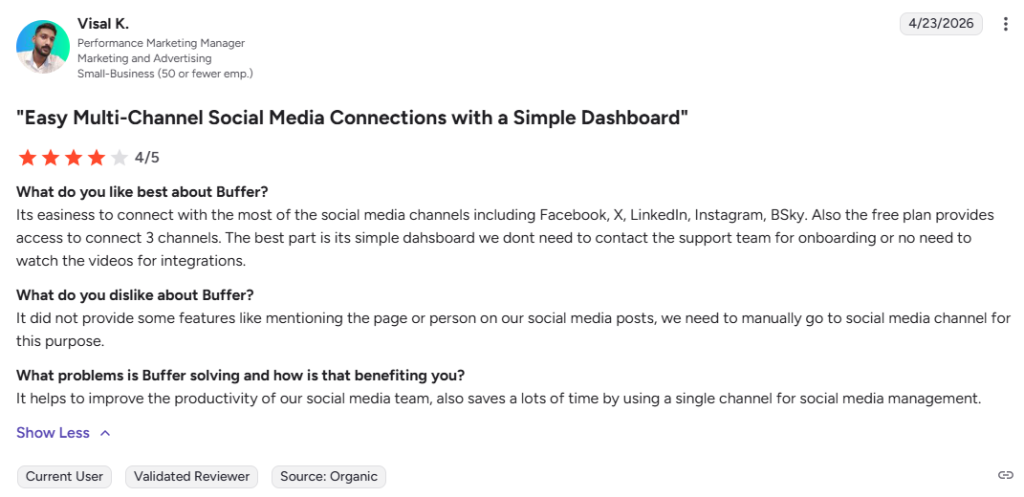
Buffer reviews generally evaluate the platform around ease of use, social media scheduling, content planning, multi account management, pricing, and analytics depth. G2 review summaries highlight ease of use, intuitive scheduling, multi account management, content calendar clarity, and time savings, while some users note that analytics features could be more comprehensive.
Capterra review summaries also describe Buffer as useful for planning, editing, rescheduling, automated publishing, and managing multiple social media accounts from one dashboard. Buyers should verify live ratings and review counts before publication because review totals, scores, and recent sentiment can change across G2, Capterra, Trustpilot, and Software Advice.
Alternatives of Buffer
Buffer alternatives include social media management platforms for buyers who need deeper analytics, stronger inbox management, social listening, influencer workflows, competitor analysis, or agency reporting.
- Hootsuite is best for teams that need scheduling, content creation, analytics, social listening, and a unified inbox in one platform. Choose it when the buyer needs broader social media management depth than Buffer, including advanced listening, message routing, and larger team workflows.
- Sprout Social is best for brands that need publishing, engagement, analytics, influencer marketing, and social ROI reporting. Choose it when the buyer wants a more advanced social media management platform for customer engagement, reporting, and brand level visibility.
- Later is best for creators and brands that need visual social scheduling, influencer marketing, campaign management, and performance insights. Choose it when the buyer wants a creator focused workflow with strong scheduling and influencer campaign support.
- SocialBee is best for users that need AI assisted scheduling, content categories, post recycling, team collaboration, and engagement tools. Choose it when the buyer wants a content calendar built around category based posting and repeatable social content workflows.
- Agorapulse is best for teams that need publishing, inbox management, reporting, and organized social media operations. Choose it when the buyer wants stronger inbox and reporting workflows for managing comments, messages, and campaign performance.
- Metricool is best for social media managers, agencies, freelancers, creators, and influencers that need scheduling, analytics, reporting, competitor analysis, and link in bio tools. Choose it when the buyer wants social media planning, measurement, competitor monitoring, and reporting in one lower complexity platform.
- Zoho Social is best for businesses and agencies that need scheduling, monitoring, analytics, and supported channel management across X, Instagram, Facebook, Google Business Profile, LinkedIn, YouTube, Pinterest, Mastodon, and TikTok. Choose it when the buyer wants social media management connected to the wider Zoho business software ecosystem.