

What Is Zoho?
Zoho is a comprehensive cloud-based business software suite offering 55+ integrated applications covering CRM, sales, marketing, finance, HR, project management, customer support, and more.
Used by over 100 million users worldwide, it is one of the most affordable and scalable all-in-one business platforms available for small businesses, growing teams, and enterprises.
Who It Is For
Small businesses, startups, growing SMBs, and enterprise teams who want an integrated suite of business tools without paying separate subscription fees for multiple disconnected software products.
Best Use Case
Managing the entire customer lifecycle from lead capture and sales pipeline management to customer support, invoicing, and marketing automation inside one connected platform.
Standout Value
A free CRM plan for up to 3 users, paid plans starting at $14 per user per month, and the Zoho One bundle giving access to 50+ business applications for around $37 per user per month making it one of the most cost-effective all-in-one business suites on the market.
Setup Time and Support
Most Zoho products are up and running quickly via browser with mobile apps available on iOS and Android.
A 15-day free trial is available on all paid CRM plans with no credit card required. Support available via email, phone, documentation, and live chat with premium support options on higher tiers.
Why Zoho Stands Out
Unlike point solutions that solve one problem, Zoho is built as an integrated ecosystem. Every application shares data natively meaning your CRM, helpdesk, accounting, and marketing tools all work together without manual syncing, third-party integrations, or additional costs.
Zoho Key Features
| Feature | Description |
| Zoho CRM | A full-featured CRM for lead management, sales pipelines, workflow automation, and forecasting suitable for businesses of all sizes. |
| Zia AI Assistant | Built-in AI that predicts optimal contact times, scans email urgency, suggests next actions, and surfaces relevant search data. |
| Sales Automation | Eliminates repetitive tasks through lead assignment, follow-up reminders, email sequences, and deal stage progression via blueprints. |
| Multichannel Communication | Centralizes customer interactions via email, phone, live chat, social media, and web forms within a single interface. |
| Zoho One Suite | An all-in-one subscription providing access to 50+ integrated apps covering finance, HR, projects, helpdesk, and marketing. |
| Canvas Customization | A no-code, drag-and-drop redesign tool that allows teams to customize the CRM interface to match their specific workflow. |
| Zoho Analytics | Advanced BI and reporting that unifies data across various Zoho apps for cross-department insights and dashboards. |
| Territory Management | Organizes sales teams by region or product type and automates lead assignment and performance tracking by territory. |
| Marketplace Integrations | Connects Zoho to hundreds of third-party tools like Google Workspace, Microsoft 365, Slack, and Mailchimp. |
| Sandbox Environment | A safe testing ground to trial CRM customizations and automation rules before deploying them to the live production system. |
| Mobile CRM | Dedicated iOS and Android apps providing offline access, real-time notifications, and full deal management on the go. |
Pros and Cons of Zoho
Pros
- Exceptional Value for Money: Free CRM for up to 3 users and paid plans starting at $14 per user per month make Zoho one of the most affordable full-featured CRM and business suite options available
- All-in-One Ecosystem: 55+ natively integrated applications covering every business function means less time managing disconnected tools and lower overall software spend
- Zoho One Bundle: Access to 50+ applications for around $37 per user per month on the All Employee plan delivers enterprise-level software breadth at a fraction of competitor pricing
- Highly Customizable: Canvas drag-and-drop layouts, custom modules, custom fields, and workflow automation let businesses tailor the platform to their exact processes without coding
- Strong Automation Capabilities: Workflow rules, blueprints, and AI-powered suggestions automate repetitive sales and support tasks reducing manual admin across teams
- Free Plan Available: The free CRM tier supports up to 3 users with no time limit making it a genuine starting point for very small businesses and startups
- SOC 2 Compliance and GDPR Support: Enterprise-grade security controls and compliance features make Zoho a credible choice for US businesses with data security requirements
Cons
- Steep Learning Curve: The breadth of features and customization options can overwhelm new users requiring significant time investment to set up and fully utilize the platform
- Feature Gaps Between Tiers: Advanced features like Zia AI, territory management, and sandbox testing are only available on Enterprise and Ultimate plans creating a significant jump in cost
- Customer Support Response Times: Some users on lower-tier plans report slower support response times which can be problematic for businesses that depend on fast issue resolution
- Interface Complexity: The sheer number of applications and settings can make the platform feel cluttered and difficult to navigate for teams that only need a subset of features
- Add-On Costs Can Add Up: Premium support, additional storage, and advanced modules carry extra charges that can increase the total cost of ownership beyond the base subscription price
Zoho Pricing Plans
Zoho pricing information can change. Always verify current rates and any available Zoho coupon or Zoho discount directly on zoho.com before purchasing.
| Plan | Price | Main Features |
| Standard (Best for one-time billing) | $25 / org / month (Billed annually) | • Core Invoicing: Create quotes, invoices, and progress invoicing • Operations: Multi-user access (up to 3 users), manage projects & timesheets • Global Payments: Multi-currency transactions, local language/tax customization • Automation: Automated payment reminders, customize business workflows • Client Experience: Self-service customer portal, custom domains |
| Premium (Best for one-time & subscriptions) | $59 / org / month (Billed annually) | Everything in Standard, plus: • Subscription Management: Automate usage-based pricing, handle proration, manage in-app purchases • Increased Capacity: Multi-user access for up to 10 users • Revenue Recovery: Dunning management (reduce failed payments), abandoned cart reminders • Advanced Tools: Hosted payment pages, custom modules/functions, timesheet reviews, scheduled reports |
| Enterprise Edition (Engineered for scale) | Contact Sales (Learn more) | Helps enterprises handle: • High Volume: Operational scale for high-volume customers and transactions • Advanced Finance: Advanced usage-based billing controls, flexible revenue recognition • Deep Insights: Analytics with forecasting and AI insights • Customization & Support: In-depth module/report customization, priority support, dedicated account manager |
For the most accurate, up-to-date, and full feature breakdowns, please visit the official Zoho website.
Zoho Top Integrations
- Google Workspace
- Microsoft 365
- Slack
- Mailchimp
- QuickBooks
- Stripe
- WordPress
- Twilio
- Zoom
- Zoho Internal Ecosystem
Zoho Reviews
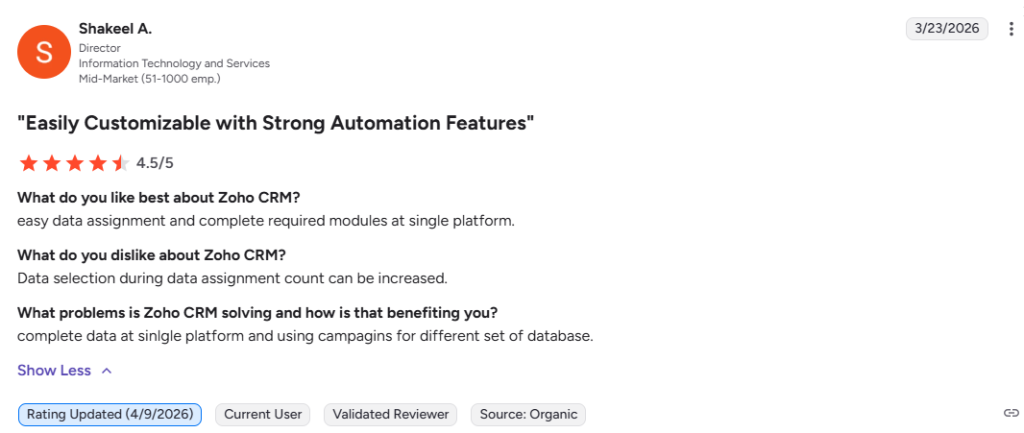
Small business owners, sales teams, and enterprise administrators have shared feedback on Zoho’s real-world performance.
The consensus centers on its exceptional value for money, broad feature coverage, deep customization options, and the strength of the Zoho One bundle for businesses that want an integrated all-in-one platform.
What Users Say About Zoho
Alternatives of Zoho
HubSpot Best for marketing-led teams who want a free CRM with strong inbound marketing, email automation, and content tools built in. Choose it when marketing and sales alignment in one platform matters more than broad business suite coverage.
Salesforce Best for large enterprises that need the most powerful and customizable CRM on the market with deep third-party integrations. Choose it when advanced customization, enterprise-grade automation, and a massive app ecosystem justify the higher price.
Pipedrive Best for sales-focused teams who want a simple, visual pipeline CRM without the complexity of a full business suite. Choose it when clean deal tracking and ease of use matter more than broad feature coverage.
Freshsales Best for small to mid-size businesses who want an AI-powered CRM with built-in phone, email, and chat at a competitive price. Choose it when a simpler onboarding experience and strong built-in communication tools are the priority.
Monday CRM Best for teams already using Monday.com for project management who want to extend it into CRM and sales tracking. Choose it when visual workflow management and flexibility across departments matter more than deep CRM specialization.
Microsoft Dynamics 365 Best for enterprises already standardized on Microsoft tools who need a tightly integrated CRM and ERP platform. Choose it when deep Microsoft 365, Teams, and Azure integration is a hard requirement for your organization.
Keap Best for small businesses and solopreneurs who want CRM combined with email marketing automation and payment processing in one simple tool. Choose it when simplicity and built-in marketing automation for small teams matter more than enterprise depth.


