

What Is Divi AI?
Divi AI is an advanced artificial intelligence-powered tool built into the popular Divi Builder, a WordPress page builder.
It helps users design websites faster and more efficiently by automating tasks like content creation, layout design, and image editing.
Divi AI uses machine learning to suggest content and layout designs that are optimized for SEO and user experience.
It also offers features such as content rewriting, AI-powered text generation, and custom-tailored templates to streamline the web design process.
Whether you’re a beginner or an experienced web designer, Divi AI can assist you in building visually appealing and highly functional websites without the need for advanced coding skills.
Who It Is For
Divi AI is ideal for web designers, marketers, business owners, and bloggers who want to speed up the website design process while ensuring high-quality results.
Best Use Case
It is best used for automating repetitive tasks in web design, content creation, and layout optimization, particularly for users who use WordPress and Divi Builder.
Standout Value
Divi AI stands out by integrating seamlessly with Divi Builder, offering AI-powered design and content suggestions that help users save time and improve design quality.
Setup Time and Support
Setting up Divi AI is quick and easy, with a user-friendly interface. Customer support is available through live chat, email, and a helpful knowledge base for troubleshooting.
Why Divi AI Stands Out
Divi AI’s seamless integration with Divi Builder, along with its AI-driven design and content optimization tools, make it a standout choice for those looking to improve their web design workflow.
Key Features
| Feature | Description |
| AI-Powered Content Creation | Generate high-quality, SEO-optimized content with just a few clicks using Divi AI’s content generation capabilities. |
| AI Layout Design Suggestions | Let Divi AI suggest optimized layouts for your page based on the content and design goals you input. |
| SEO Optimization | Automatically optimize your content for search engines, helping your website rank better with AI-powered suggestions. |
| Customizable Templates | Choose from a wide range of AI-generated templates that are designed for various industries and business needs. |
| Image Editing and Suggestions | Divi AI suggests and edits images for your website to improve user experience and design aesthetics. |
| Text Rewriting and Summarization | Use AI to rewrite content for better clarity, engagement, or SEO, or to generate summaries for long-form content. |
| Mobile Optimization | Ensure your website is fully responsive and optimized for mobile devices with AI-driven adjustments. |
| Time-Saving Workflow | Streamline your web design process by automating repetitive tasks like content creation, layout optimization, and more. |
Divi AI Top Integrations
Divi AI seamlessly integrates with various tools and platforms to enhance the website design process. Here are some of its top integrations:
- WordPress: As a WordPress plugin, Divi AI integrates natively with the WordPress ecosystem, making it easy to incorporate into your existing website.
- Divi Builder: Divi AI is fully integrated with Divi Builder, enhancing the functionality of this page builder by adding AI-powered design suggestions and content creation tools.
- Google Analytics: Track the performance of your AI-optimized website directly within Google Analytics, providing insights into user behavior and engagement.
- Yoast SEO: Optimize content for SEO with Divi AI’s integration with Yoast SEO, ensuring your content is search engine-friendly and ranks higher.
- Zapier: Connect Divi AI with over 1,000 other apps through Zapier to automate workflows and sync data across platforms.
- WooCommerce: Easily integrate Divi AI with WooCommerce for eCommerce sites, allowing AI-driven product recommendations and optimized product page layouts.
Pros and Cons of Divi AI
| Pros | Cons |
| AI-Powered Content Creation: Generate content quickly and efficiently with Divi AI’s advanced algorithms, saving time. | Requires Divi Builder: Divi AI is only available for users of Divi Builder, so it is not suitable for those using other page builders. |
| Ease of Use: The integration with Divi Builder makes Divi AI easy to use, even for beginners, without any coding knowledge. | Subscription-Based: Divi AI requires a subscription, which may not be ideal for users looking for a one-time payment solution. |
| Automated SEO Optimization: Divi AI’s SEO suggestions can improve website rankings without the need for manual SEO work. | Limited to Divi Themes: It works best with Divi themes and may not be as effective with other WordPress themes. |
| Customizable Templates: Access a wide variety of templates that are optimized by AI for different industries and use cases. | Dependence on AI: Some users may prefer a more hands-on approach to content creation and design rather than relying on AI suggestions. |
| Time-Saving: Automation of design and content tasks can significantly reduce the time required to build and optimize a website. | Learning Curve: New users may experience a short learning curve as they adjust to AI-powered features and understand how to best use them. |
Pricing Plans
| Plan | Price | Features |
| Free Plan | $0/month | Includes basic features such as content suggestions and template recommendations for one-page designs. Ideal for users just starting out with Divi AI. |
| Pro Plan | $89/year | Includes everything in the Free Plan, plus advanced features like AI-driven layout customization, SEO optimization, and unlimited content generation. Suitable for growing websites. |
| Business Plan | $149/year | Includes all Pro Plan features, plus priority support, additional integrations, and enhanced performance tracking. Best for businesses needing more robust features and scalability. |
| Agency Plan | Custom pricing | Fully customizable plan with dedicated support, API access, and enterprise-level customization for large teams or agencies. |
Note: The information may change. For the most accurate, up-to-date, and full feature breakdowns, please visit the official Divi AI website.
You can often find Divi AI discount coupons or promotional codes on their official website or third-party coupon sites for savings on your subscription.
Reviews
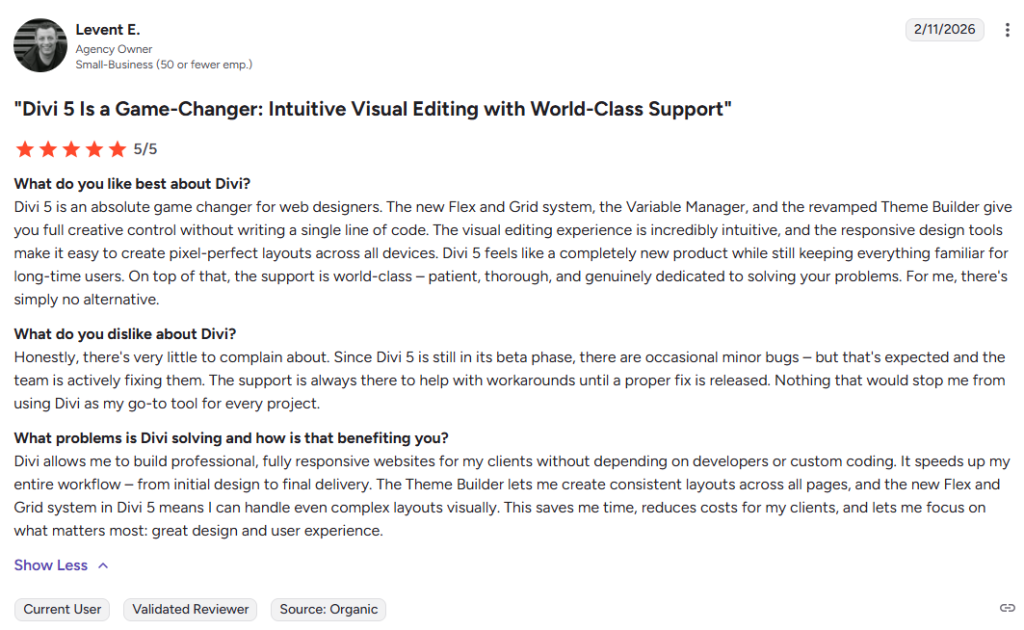
Users highly praise Divi AI for its powerful on-page optimization tools, ease of use, and the ability to improve rankings quickly. It is especially valued for its content editor, which helps users create SEO-optimized content in real-time.
Many businesses and SEO professionals also appreciate the comprehensive SEO audits and detailed keyword research features.
Alternatives
If you’re considering alternatives to Divi AI, here are some solid options:
- Elementor AI: Best for WordPress users who need an intuitive page builder with AI-powered design suggestions. Choose it when you want a user-friendly interface and customizable templates.
- Wix ADI: Ideal for users looking to create websites quickly with minimal effort. Choose it when you need AI-driven web design and content creation for your Wix site.
- Webflow: Best for advanced users looking for high customization. Choose it when you need AI tools for automating design and creating sophisticated websites with a visual builder.
- SquareSpace: Best for entrepreneurs and creatives looking to build elegant websites with ease. Choose it when you need a reliable platform with AI-driven templates and design assistance.
- GoDaddy Website Builder: Ideal for beginners who want to create a website in minutes with minimal customization. Choose it when you need AI to guide your design process on a budget.


