

What Is Murf AI?
Murf AI is an AI voice platform built for text to speech, voiceovers, dubbing, and voice driven content workflows. It combines Murf Studio for voice production, Murf Falcon for voice agent APIs, AI dubbing for multilingual video translation, Murf Reader for audio from webpages, and integrations for presentation and content tools.
For buyers comparing features and looking for a Murf AI coupon, the main value is breadth. Murf AI covers realistic voice generation, voice changing, dubbing, studio editing controls, and workflow integrations inside one product family, which makes it relevant for creators, marketers, training teams, and product teams that need more than a basic text to speech tool.
Who It Is For
Murf AI fits creators, marketers, learning teams, localization teams, and developers that need voice generation, editing control, or multilingual audio at production scale.
Best Use Case
It works best for product demos, training videos, presentations, ads, podcasts, and translated video content that need natural narration without studio recording.
Standout Value
Its standout value is product range, because Murf AI combines Studio, dubbing, API, voice changer, and integrations instead of limiting users to a single voiceover workflow.
Setup Time and Support
Setup is fast because Murf AI runs in the browser and supports signup with Google, Microsoft, Slack, or email. Murf also highlights an average chat response time under 3 minutes on its public site.
Why Murf AI Stands Out
Murf AI stands out because it pairs realistic voices with presentation integrations, dubbing, enterprise grade security, and a low latency API for voice agents.
Key Features
| Feature | What it does | Why it matters |
| Text to speech | Generates realistic voiceovers from text with 200 plus voices in 35 plus languages and 10 plus accents. | Gives teams broad voice coverage for marketing, training, product, and content workflows. |
| Murf Studio controls | Lets users adjust tone, speed, pitch, pause, pronunciation, variability, and emphasis inside the Studio editor. | Adds production control that improves clarity and reduces rework. |
| Voice changer | Converts uploaded recorded speech into Murf AI voices while retaining timing. | Helps teams replace rough narration with polished AI output. |
| AI dubbing | Translates and localizes video content into 40 plus languages. | Supports multilingual distribution from one source video. |
| Integrations | Connects with Canva, Google Slides, PowerPoint, Adobe Audition, and Adobe Captivate. | Reduces export friction for presentation, eLearning, and content teams. |
| API | Offers Murf Falcon TTS for voice agents with low latency, multilingual support, and scalable deployment. | Extends Murf AI beyond content creation into product and automation use cases. |
| Reader and embed workflows | Supports webpage audio conversion and HTML embed based audio playback. | Expands Murf AI into publishing and content accessibility workflows. |
| Enterprise controls | Supports security, data residency, and enterprise support paths for advanced use cases. | Improves fit for regulated teams and larger deployments. |
The feature set above is based on Murf’s public product pages and help center documentation for Studio, API, voice changer, dubbing, and integrations.
Murf AI Top Integrations
Murf AI has a stronger integration story than many voice only tools because it supports presentation, authoring, editing, and embed workflows. That makes it easier to move from script to narrated asset without rebuilding the same voiceover in separate tools.
- Canva: Add Murf voiceovers directly inside Canva to turn static designs into narrated presentations and videos.
- Google Slides: Add natural sounding narration to slide decks for training, sales, and async presentations.
- PowerPoint: Generate narration from speaker notes or custom script and add the output to slides from the plugin.
- Adobe Captivate: Bring Murf voices into eLearning workflows that need polished narration.
- Adobe Audition: Use Murf voices in audio production workflows where editing and refinement happen in Audition.
- HTML Embed Code: Add playable audio to websites and pages built in platforms like WordPress, Notion, and Wix.
Pros and Cons of Murf AI
| Pros | Cons |
| Diverse Product Breadth: Strong features across Studio, dubbing, reader, voice changer, and API for various needs. | Trial Limitations: Free trial does not include downloads, making it strictly a testing environment rather than a publishing plan. |
| Multilingual Support: Broad voice and language coverage makes it ideal for global and multilingual content teams. | Enterprise Cloning: Voice cloning is not self-serve and is currently limited to Enterprise-level use cases only. |
| Third-Party Integrations: Solid integration with popular tools like Canva, PowerPoint, Google Slides, and Adobe. | Feature Gating: Advanced workflows, such as audio-to-text, are restricted to higher-tier plans rather than entry levels. |
| Advanced Editing Controls: Granular controls for pronunciation, pace, tone, and emphasis available inside the Studio. | Pricing Inconsistency: Documentation and public pricing sometimes use different labels, requiring careful verification. |
| Robust API Access: Offers a useful API path for developers building real-time voice agents and product integrations. | Cost for Simple Needs: Users seeking only basic text-to-speech may find the tool over-engineered and more expensive than necessary. |
These pros and cons are grounded in Murf’s official product pages, help center articles, and current public pricing overview.
Murf AI Pricing Plans
Verify pricing on the official website. The information may change. For the most accurate, up to date, and full feature breakdowns, please visit the official Murf AI website.
Murf’s public pricing overview currently highlights Free, Creator, Business, and Enterprise. Some help center documentation also references Growth in workspace permissions and upgrade flows, so it is worth validating the current lineup before publishing a final comparison page.
| Plan | Price | What it includes |
| Free | $0 | The free option is built for exploration and short tests. Murf says it includes 10 minutes of voice generation, 10 minutes of transcription, access to voices and premium Studio features for testing, and no downloads. |
| Creator | Starts at $19 per month, billed annually | Creator is the entry paid plan in Murf’s public pricing overview. It fits solo creators and smaller teams that need downloads, paid usage rights, and a production ready voice workflow instead of trial only access. |
| Business | Starts at $66 per month, billed annually | Business is positioned for heavier use, larger teams, and more advanced workflow needs. It is the better fit when usage volume, permissions, or team collaboration become more important than low entry price. |
| Enterprise | Custom pricing | Enterprise is the high control tier for organizations that need custom support, advanced security, account management, custom agreements, and enterprise deployment options. It is also the current path Murf documents for voice cloning. |
The safest way to find a valid Murf AI coupon is to check the official pricing page first. Murf’s help center says yearly plans offer a flat 33 percent discount on subscriptions, so the most reliable Murf AI coupon equivalent is usually the annual billing discount rather than a third party promo code.
Murf AI Reviews
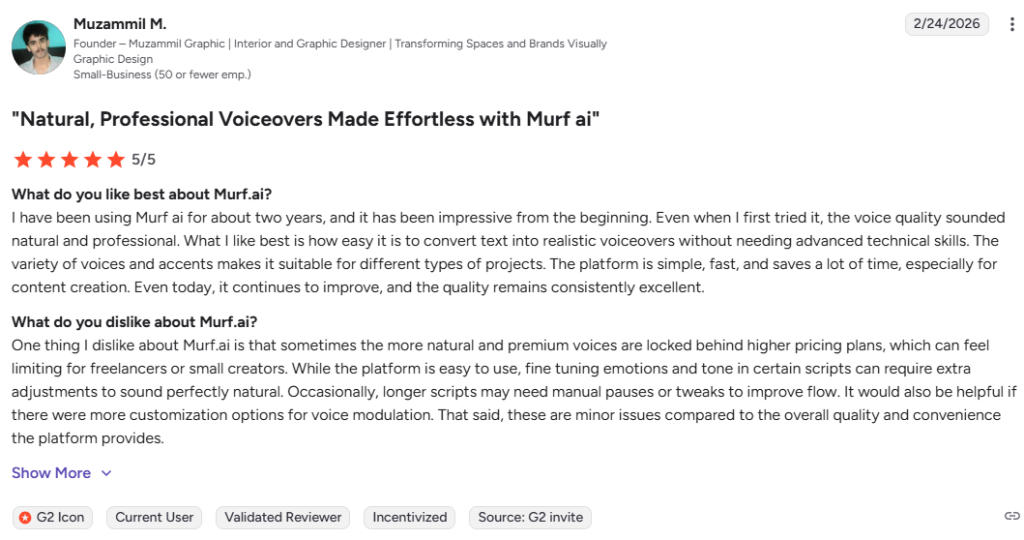
Public Murf AI reviews are strong on major software review platforms. G2 currently shows a 4.7 out of 5 rating based on user reviews, and review themes frequently mention natural voice quality, editing control, ease of use, and presentation workflows, while some users still flag pricing and feature gating on higher plans.
Alternatives of Murf AI
- ElevenLabs is best for teams that prioritize expressive voice realism, voice libraries, and fast voice generation for audio heavy workflows. Choose it when voice quality and emotional range matter more than presentation integrations.
- Synthesia is best for business teams creating avatar led training, internal communications, and multilingual AI video. Choose it when avatar video is more important than pure voiceover production.
- LOVO AI is best for users that want an all in one voice and browser based video editing workflow. Choose it when built in video editing matters as much as the voice library.
- Descript is best for creators and teams that want transcript based audio and video editing. Choose it when script based editing matters more than a large dedicated voice platform.
- WellSaid is best for enterprise teams that want licensed voices and clear voice actor provenance. Choose it when governance, brand safety, and professional narration are the top buying criteria.
- VEED is best for marketing teams that want talking avatars, editing, and fast browser based video creation. Choose it when short form video output matters more than deep voice workflow controls.


