

Exclusive Vidnoz AI Deal
Click to reveal your exclusive code and save on annual AI video plans, starting as low as $14.99/mo.
Create AI Videos Free — No Credit Card Needed
Generate AI avatar videos with Vidnoz's free plan before upgrading for HD exports and no watermark.
SHORT SUMMARY
- Vidnoz AI turns a script into a finished avatar video in minutes, with a library of 1,900+ avatars and 2,800+ templates.
- Plans: Free, Starter ($19.99/mo annual), Business ($56.99/mo annual), Enterprise (custom).
- The free plan is genuinely generous (daily credits, no card needed), but exports are 720p with a watermark.
- Voice cloning and 4K exports are Business-tier features. Some premium voice and custom avatar options may carry extra costs beyond your plan, so confirm at checkout before assuming everything is included.
- Credits don’t roll over month to month, and they run out faster than they sound. See the section below before picking a plan.
- Best for creators and small teams who need fast, high-volume video output. Not the best fit if avatar realism or fine-tuned control matters more than speed.
What Is Vidnoz AI?
Vidnoz AI is a video generation platform built around AI avatars and pre-made templates, letting creators produce a finished video without filming or editing manually. The library includes 1,900+ avatars and a wide range of AI voices, covering most of the setup work a marketing or educational video would otherwise need done by hand.
For teams producing video regularly, the appeal is mostly output speed. Swapping a script into a template and picking an avatar cuts out the production time a traditional video would need, which matters most for social content that needs to go out often and can’t wait on a full production cycle.
Who It Is For
Vidnoz AI is built for small business owners, social media creators, and educators who need to produce a high volume of video content on a limited budget. It also works well for sales teams creating personalized outreach videos.
Best Use Case
It’s most effective for short social clips, quick explainer videos, and personalized outreach, where speed matters more than cinematic polish.
Standout Value
Its standout value is the combination of a huge asset library (1,900+ avatars, 2,800+ templates) and a genuinely usable free plan, letting beginners test real output before paying anything.
How Many Credits Do You Actually Need?
Vidnoz prices its paid plans in credits, and this is where a lot of buyers get surprised. Independent testing puts it at roughly 1 credit per 2 seconds of video, and unused credits do not carry over to the next month.
Here’s what that looks like in practice:
- A 2-minute explainer video uses around 60 credits.
- On the Starter plan, 3 short client-style videos a month can be enough to hit your ceiling.
- The Business plan’s larger credit pool fits regular weekly output better than occasional use.
Before you upgrade: count how many minutes of finished video you actually need this month, not how many you’d like to make, since credits don’t roll over and unused capacity is lost at the end of each billing cycle.
Setup Time and Support
You can generate your first AI video in under 2 minutes with the drag-and-drop editor. Support is available through the help center and email, though see the Cons section below for a common complaint about response times.
Why Vidnoz AI Stands Out
Vidnoz bridges the gap between complex enterprise video tools and simple mobile editors, offering a large asset library and fast output at a lower entry price than most competitors.
Key Features
Vidnoz AI features a massive library of 1,900+ realistic avatars and 2,800+ professional templates. Use a vidnoz ai coupon to access these high-speed tools for creating viral social media and business videos.
The platform includes advanced tools like AI Video Translation and voice cloning to reach global audiences effortlessly. Secure a vidnoz ai discount to unlock 4K exports and interactive features for your marketing.
Feature | What It Does | Why It Matters |
1,900+ AI Avatars | A large library of photorealistic avatars to act as your on-screen presenter. | Skips the cost of filming or hiring talent. |
2,800+ Templates | Industry-specific templates for social and training content. | Cuts down design and setup time significantly. |
AI Video Translator | Dubs videos into 140+ languages with lip-sync matching. | Helps content reach international audiences without reshoots. |
Voice Cloning | Creates a digital replica of your voice. Business plan feature; confirm current pricing, as some sources report add-on costs for premium cloning. | Keeps your personal voice consistent across projects. |
AI Talking Photo | Animates a static photo to speak your script. | Useful for personalized greetings and profile content. |
AI Face Swap | Replaces faces in video for creative or marketing use. | Enables personalized, attention-grabbing content. |
Interactive Avatars | Adds clickable elements inside the video itself. | Can boost conversions directly inside the video. |
4K AI Enhancer | Upscales video resolution automatically. Business plan feature. | Keeps output sharp on large screens. |
Pros and Cons of Vidnoz AI
Vidnoz AI is a fast and accessible AI video platform for creating social media, marketing, and sales videos. A Vidnoz AI coupon can help users save on paid plans and unlock higher quality exports and additional features.
The platform is easy to use and offers a large asset library, but advanced creators may want more control for complex video projects.
Pros
- Massive asset library: 1,900+ avatars and 2,800+ templates, more variety than most alternatives.
- Genuinely generous free plan with daily credits and no card required to start.
- Fast rendering, often under a minute for a 1080p video.
- All-in-one creative tools: Face Swap, Talking Photo, and more beyond standard avatar video.
- Simple drag-and-drop interface, no editing experience required.
Cons
- The free plan’s watermark is large and hard to avoid, which limits it to testing rather than real publishing use.
- Fine control over facial expressions and gestures is limited compared to higher-end tools.
- Credits don’t roll over, and a couple of longer videos can use up a monthly allowance faster than expected.
- 4K exports and voice cloning are locked behind the Business tier, and some premium voice/avatar options may cost extra on top.
- Users on free or lower tiers report slow email support response times.
Pricing Plans
Vidnoz AI offers a tiered pricing structure that balances daily free usage with high-performance paid plans. By choosing an annual subscription, users receive a 25% vidnoz ai discount, which is the most effective way to lower the cost of high-volume video production in 2026.
Using a vidnoz ai coupon or vidnoz ai coupon code during checkout can provide additional savings on top of the annual rate. These plans are designed to scale with your content needs, whether you are an individual creator needing a few minutes of video or an enterprise team requiring unlimited duration and priority rendering.
Plan | Annual Price (Per Month) | Monthly Price | Ideal User | Key Features |
Free | $0 | $0 | Beginners testing the platform | 3 min/day video generation, 1,900+ avatars, 720p with watermark |
Starter | $19.99 | $26.99 | Solo creators | 15 min/month, no watermark, 1080p export |
Business | $56.99 | $74.99 | Marketing teams | 30+ min/month, 4K export, voice cloning, brand kit, priority processing |
Enterprise | Custom | Custom | Large agencies | Unlimited duration, dedicated account manager, team collaboration |
Annual billing applies a 25% discount automatically. Some premium features like custom voice cloning or custom avatars may carry additional costs on top of your plan, so confirm current pricing at checkout. For the most accurate, up to date breakdown, visit the official Vidnoz AI website.
Vidnoz AI Top Integrations
- Gmail
- HubSpot
- Salesforce
- Shopify
- Slack
- Trello
- Zoom
- Google Meet
- Google Chat
- Zapier
Reviews
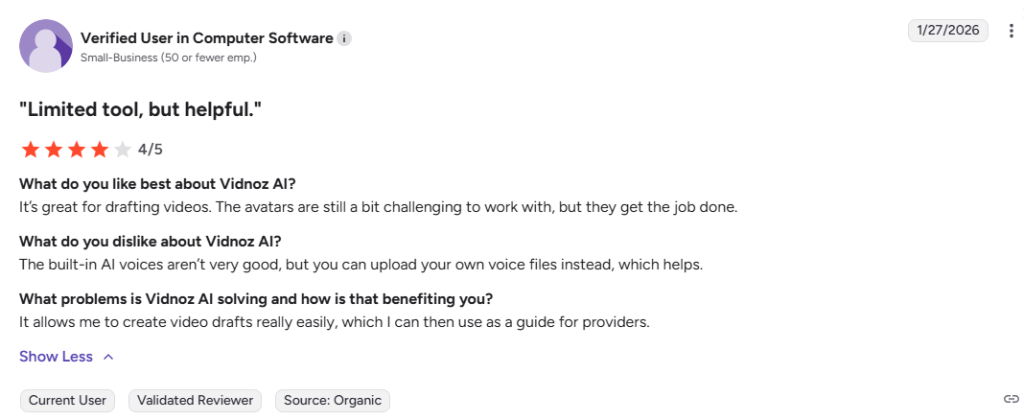
Vidnoz AI is popular among social creators and small business owners for its huge asset library and fast output. Reviewers consistently note that customization is simpler than higher-end alternatives, but for fast, high-volume content, it’s considered hard to beat on price.
Alternatives of Vidnoz AI
Vidnoz AI alternatives offer a range of specialized tools for creators who need more than just high-speed template generation. While using a vidnoz ai coupon makes Vidnoz the most affordable option for volume, other platforms in 2026 provide superior avatar realism, enterprise security, or advanced interactive features.
Choosing the right alternative depends on whether you prioritize “viral” social media speed or professional, high-fidelity corporate communication. These vidnoz ai alternatives represent the best of the market for specialized video workflows, from AI-driven translation to broadcast-quality digital twins.
- HeyGen is best for the highest avatar realism and premium voice cloning at a lower plan tier than Vidnoz’s Business plan.
- Synthesia is best for enterprise training with SOC 2 compliance and SCORM export.
- Colossyan is best for interactive learning modules with branching scenarios and quizzes.
- Vozo AI is best for localizing existing video assets with advanced dubbing.
- DeepBrain AI (AI Studios) is best for broadcast-quality news-style presentations.
- Fliki AI is best for turning blog posts into video quickly.
- VEED is best for creators who want full post-production editing alongside AI generation.
- D-ID is best for talking photo animation and conversational AI agents.
FAQs of Vidnoz AI
Final Verdict
Vidnoz AI is a strong pick if you need to produce a high volume of avatar-based video fast, without a big budget. It’s not the best pick if avatar realism or fine creative control matters more to you than speed, HeyGen and Synthesia lead there.
Best for: Creators and small teams producing frequent, fast-turnaround video content. Skip it if: You need the most realistic avatars or deep post-production control. Before you upgrade: map your real monthly video minutes against the credit system so you don’t pay for capacity you’ll lose at the end of the month.


