What Is Voibe?
Voibe is a Mac-only dictation app that processes speech entirely on the device using local Whisper AI models. No audio is sent to external servers, no internet connection is required, and voice data is discarded the moment transcription completes. Users hold a keyboard shortcut, speak, release, and the transcribed text appears in whatever Mac application their cursor is in. The product is developed by Essence AI Ltd and is Mac-only, with no Windows, iOS, or Android version available at the time of writing.
Who It Is For
| User Type | Notes |
| Lawyers, healthcare providers, and privacy-conscious professionals | The affiliate programme page explicitly names these as the primary audience; the product homepage notes that no audio ever leaves the device, making it suitable for confidential client work and privileged communications |
| Developers | A dedicated Developer Mode integrates with VS Code, Cursor, and Windsurf, resolving file names, folder names, and workspace-specific vocabulary from an active project |
| Writers and content creators | The product homepage describes dictating articles, scripts, and social posts faster than typing, and mentions hands-free sessions of up to 5 minutes |
| AI power users | The affiliate programme page and homepage both describe giving richer voice-based prompts to tools like Claude, ChatGPT, and Perplexity via dictation |
| Small teams on Mac | A Team plan is available for a minimum of 3 seats, with centralised billing and the same full feature set as the individual plan |
Key Features
- 100% on-device processing: Speech is transcribed locally using Whisper AI models. No audio is sent to any external server and no internet connection is required for dictation.
- System-wide text insertion: Dictated text is inserted wherever the cursor is across any Mac application, including Slack, Notion, VS Code, ChatGPT, and email clients.
- Developer Mode: A dedicated mode for VS Code, Cursor, and Windsurf that resolves file names, folder names, and workspace-specific terminology from an active project.
- Memory: An expandable text shortcut system that lets users trigger longer phrases, URLs, signatures, or boilerplate through spoken shortcuts.
- Custom Vocabulary: Users can add names, code terms, and domain-specific language to a custom dictionary, with bulk editing supported.
- Smart Punctuation: Spoken punctuation commands are supported.
- Speed vs Accuracy modes: Lets users choose between faster or more accurate transcription, with model recommendations matched to the user’s hardware.
- Live Dictation: Real-time on-screen text appears as the user speaks rather than only after release.
- Hands-free sessions: Sessions of up to 5 minutes without holding a key.
- Requires Apple Silicon (M1 or later): The app requires Apple Silicon and macOS 13 (Ventura) or later. It is not available for Intel Macs or non-Mac platforms.
- 7-day free trial: Available on all paid plans with no credit card required to download.
- 30-day money-back guarantee: Available on every plan, no questions asked.
Pros and Cons
Strengths:
- All processing happens on the device with no audio leaving the Mac, which the product positions as a direct differentiator for professionals handling sensitive or confidential material.
- No internet connection is required, meaning dictation functions on flights, in poor-signal areas, and without dependence on server availability.
- Developer Mode with VS Code and Cursor integration is described across comparison pages as a feature not available in competing on-device dictation tools.
- A Lifetime plan is available at a one-time price, avoiding recurring subscription costs entirely.
- A 4.8 out of 5 rating on Product Hunt is noted on the Voibe resources page. This figure was not independently verifiable from Product Hunt’s live pages at the time of writing.
Criticisms:
- The app is Mac-only and requires Apple Silicon (M1 or later). A Windows waitlist exists on the website but no release date has been announced.
- There is no permanent free tier; only a 7-day trial is available before a paid plan is required.
- Current verified criticism data from independent review platforms (G2, Capterra, Trustpilot) is not clearly available for Voibe at the time of research.
Pricing
The pricing page displays promotional prices reduced from standard rates. The figures below reflect the current prices as shown on the pricing page at the time of research. Standard (non-promotional) rates are also noted where visible. All plans include a 7-day free trial and a 30-day money-back guarantee. Payments are processed by LemonSqueezy.
| Plan | Current Price | Standard Price | Notes |
|---|---|---|---|
| Monthly | $7.50/month | $9.90/month | Full feature set, billed monthly |
| Annual | $59/year | $89.10/year | Full feature set, billed annually, equivalent to 4 months free at the promotional rate |
| Lifetime | $149 one-time | $198 one-time | Pay once, access forever. The pricing page noted 19 remaining licences at this price at the time of research |
| Team Monthly | $6/seat/month | $7.50/seat/month | Minimum 3 seats, centralised billing, full feature set per seat |
| Team Annual | $49/seat/year | $59/seat/year | Minimum 3 seats, centralised billing. The pricing FAQ notes the standard team annual rate as $48/seat/year; the promotional page shows $49/seat/year |
| Team Custom | Contact sales | Not published | For teams of 10 or more seats, custom pricing and tailored terms available via a contact form |
As prices are subject to change and a promotional discount is active, readers should verify the current figure at getvoibe before purchasing.
Reviews
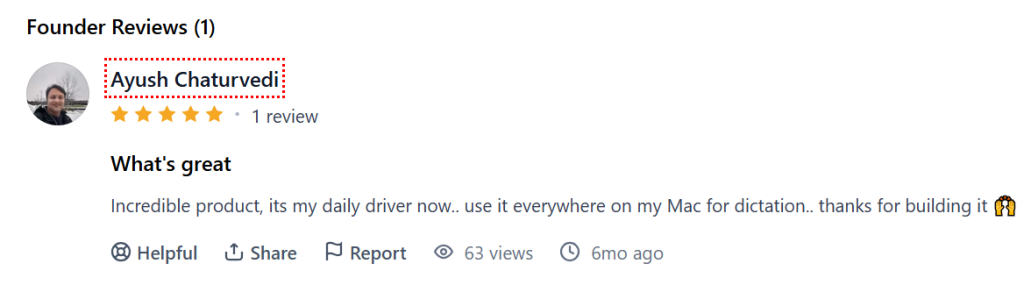
The product’s own 4.8 out of 5 rating on Product Hunt.
Positive themes (from the company’s own testimonials and comparison pages):
- Speed and privacy are the two themes most consistently mentioned by users across the company’s own pages; users specifically describe the offline nature as a requirements for their professional work.
- Developer Mode and VS Code integration are described as standout features in third-party comparison articles.
Critical themes:
- Current verified criticism data from independent review platforms is not clearly available. Comparisons written on Voibe’s own resource pages acknowledge that VoiceInk is 80% cheaper at $39.99 one-time and that SuperWhisper offers more model customisation options, though these comparisons are authored by Voibe’s own team.
Alternatives
The following tools are named as direct comparisons across Voibe’s own comparison and alternatives pages, with the disclosure that those pages are written by the Voibe team:
- Apple Dictation: built into macOS, free, but capped at a 30-second timeout per session and has no custom vocabulary.
- SuperWhisper: an on-device Mac dictation app with a lifetime price of $249.99 and more model configuration options than Voibe.
- Wispr Flow: a cloud-based Mac dictation app priced at $15/month that adds AI text rewriting on top of transcription but sends audio and screen content to external servers.
- VoiceInk: an open-source on-device Mac dictation app priced at $25 to $49 one-time, described as 80% cheaper than Voibe’s lifetime plan, though with fewer developer-focused features.
- Dragon Professional: the long-standing dictation software, now Windows-only at $699 for the desktop version and $15/month for the cloud version; the Mac version was discontinued in 2018.
FAQ’s
Editorial Note:
This article is written with care, but some details may change or contain unintentional mistakes. If you find anything outdated or incorrect, please contact us so we can review and correct it.