

What Is Calendly?
Calendly is an automated scheduling tool designed to simplify the process of setting up meetings. It eliminates the back-and-forth communication often involved in scheduling by allowing users to create customizable availability slots that others can book.
Whether for one-on-one meetings, group events, or team scheduling, Calendly integrates seamlessly with Google, Outlook, Office 365, and iCloud calendars to ensure there are no conflicts. With an intuitive interface, Calendly makes scheduling straightforward and efficient, helping professionals save time and streamline their workflow.
Who It Is For
Calendly is ideal for professionals, businesses, and teams that need to schedule meetings or appointments without the hassle of back-and-forth emails.
Best Use Case
It’s best used for client meetings, interviews, webinars, or team syncs where managing multiple schedules is necessary.
Standout Value
Calendly stands out by automating the entire scheduling process, reducing time spent on manual coordination, and improving overall productivity.
Setup Time and Support
Setting up Calendly takes only a few minutes, and users can access a wide range of support options, including tutorials, email assistance, and a robust help center.
Why Calendly Stands Out
Calendly’s intuitive design, customizability, and integration with various calendar platforms make it the go-to scheduling tool for thousands of businesses worldwide.
Key Features
| Feature | Description |
| Customizable Scheduling Links | Create personalized booking links that reflect your availability and work hours. |
| Time Zone Detection | Automatically adjusts for time zone differences, ensuring accurate scheduling across regions. |
| Calendar Integrations | Sync Calendly with Google, Outlook, Office 365, and iCloud calendars to avoid conflicts. |
| Automated Reminders | Send automated email and SMS reminders to reduce no-shows and keep meetings on track. |
| Group Scheduling | Allows users to organize group events with ease, ensuring that all participants can select their preferred time. |
| Recurring Events | Schedule repeating meetings for regular sessions such as weekly check-ins or monthly reviews. |
| Payment Integration | Integrate with PayPal and Stripe to collect payments when booking meetings (premium feature). |
| Zapier Integration | Connect Calendly with over 1,000 apps to automate workflows, including CRM and email marketing tools. |
Calendly Top Integrations
Calendly integrates with a variety of popular tools to streamline your scheduling and workflow processes. Here are some of its top integrations:
- Google Calendar: Automatically sync your events and availability, making sure your scheduling is up-to-date across platforms.
- Outlook Calendar: Sync meetings and availability directly with your Microsoft Outlook calendar for seamless scheduling.
- Zoom: Easily add Zoom video conferencing links to your scheduled events, making remote meetings simple.
- Slack: Use Slack to schedule meetings directly from your chat interface, keeping your team connected and organized.
- Zapier: Automate actions between Calendly and over 1,000 apps, including CRMs, email platforms, and more.
- Microsoft Teams: Schedule meetings directly within Teams, ensuring smooth collaboration with colleagues.
- Salesforce: Sync your meetings and leads, helping you track and manage client interactions efficiently.
Pros and Cons of Calendly
| Pros | Cons |
| Time-Saving Automation: Automates the scheduling process, reducing back-and-forth communication. | Limited Features on Free Plan: The free plan lacks some advanced features like group scheduling and integrations. |
| Easy to Use: User-friendly interface with minimal setup required. | Customization Restrictions: Some customization options are only available in higher-tier plans. |
| Calendar Integrations: Syncs with major calendar platforms like Google, Outlook, and iCloud. | Limited Customer Support: Support is mainly through email and help articles, with no live chat on the free plan. |
| Automated Reminders: Reduces no-shows by sending reminders for meetings. | Pricing for Premium Features: Access to advanced features like payment integration requires a paid plan. |
| Flexible Scheduling: Supports one-on-one, group, and recurring meetings. | Occasional Sync Issues: Some users report issues with calendar syncs, especially with third-party apps. |
Pricing Plans
| Plan | Price | Features |
| Free Plan | $0/month | Unlimited one-on-one meetings, basic integrations with Google, Outlook, Office 365, iCloud calendars, automatic scheduling, and reminders. |
| Essentials Plan | $8/month per user | Everything in the Free Plan, plus group events, removal of Calendly branding, and integrations with Zoom and Microsoft Teams. |
| Professional Plan | $12/month per user | All features in the Essentials Plan, plus workflows with Zapier, personalized booking pages, and additional customization options. |
| Teams Plan | $16/month per user | All features in the Professional Plan, plus team collaboration tools, group scheduling, and advanced reporting. |
Note: The information may chage for the most accurate, up-to-date, and full feature breakdowns, please visit the official Calendly website.
Finding a valid Calendly coupon or discount code is easy—check for deals on their website or third-party coupon sites to save on your subscription.
Calendly Reviews
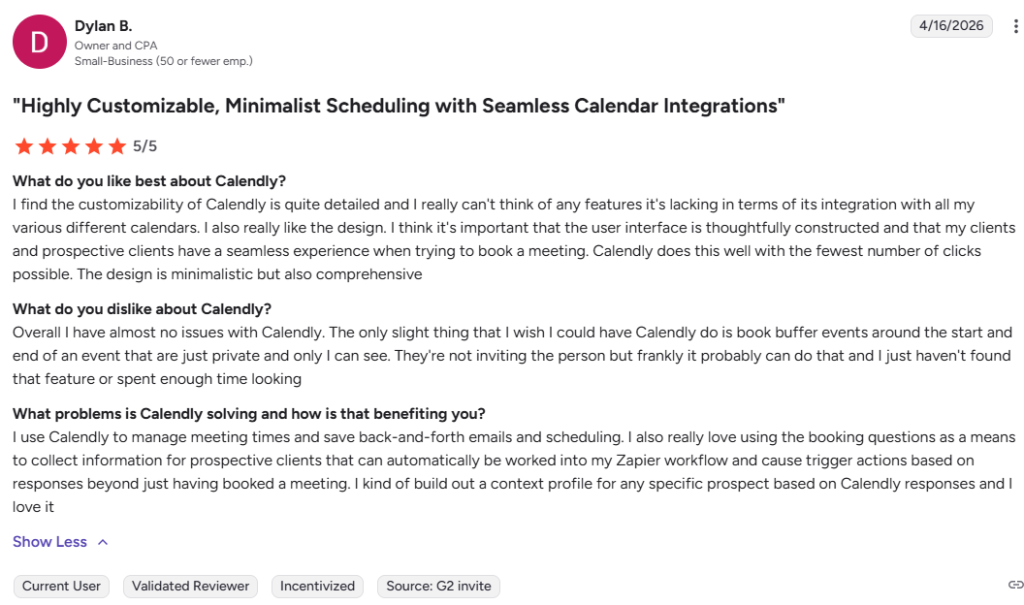
Users generally praise Calendly for its simplicity, time-saving automation, and seamless integration with popular calendar platforms. It is considered a must-have tool for professionals managing client meetings and team events.
Alternatives of Calendly
If you’re considering alternatives to Calendly, here are some solid options:
- Acuity Scheduling: Best for small businesses and teams looking for a more customizable scheduling experience. Choose it when you need advanced features like client intake forms and payment processing.
- Doodle: Ideal for group scheduling and finding the best time for meetings with multiple participants. Choose it when you have teams or clients across different time zones.
- Square Appointments: Best for service-based businesses like salons or fitness coaches. Choose it when you need a solution that integrates payment processing and appointment reminders.
- TimeTrade: Best for enterprise-level companies with complex scheduling needs. Choose it when you require robust integrations with CRM systems and advanced analytics.
- SimplyBook.me: Best for businesses that need a flexible, customizable booking system. Choose it when you need features like promotional codes and client booking management.


