

What Is Grammarly?
Grammarly is an AI-powered writing assistant that helps individuals and teams write clearly, correctly, and confidently across every platform they use. It goes beyond basic spell check to offer grammar corrections, clarity rewrites, tone detection, plagiarism checking, and generative AI writing assistance in real time.
Who It Is For
Students, professionals, freelance writers, content creators, and business teams who write frequently and want consistent, polished communication across emails, documents, and digital platforms.
Best Use Case
Real-time writing assistance for professionals and teams who need to improve grammar, clarity, tone, and originality across emails, reports, and long-form content without switching tools.
Standout Value
Works everywhere you write including Gmail, Slack, Microsoft Word, Google Docs, and browsers via extension, combining grammar checking, tone detection, plagiarism detection, and generative AI in one platform.
Setup Time and Support
Install the browser extension or desktop app in minutes with no technical setup required. Free plan available instantly with no credit card needed. Support available via help center, email, and live chat on paid plans.
Why Grammarly Stands Out
Unlike basic grammar checkers, Grammarly understands context and intent. It detects whether your tone sounds too aggressive in an email, suggests full-sentence rewrites for clarity, checks for plagiarism, and generates new content from prompts, all in the same tool you use every day.
Grammarly Key Features
| Feature | Description | Best For |
| Grammar & Spelling Checker | Real-time correction of grammar, spelling, and punctuation errors. | General writing across all platforms. |
| Clarity & Readability | Identifies wordy or unclear sentences and suggests concise rewrites. | Improving professional communication. |
| Full-Sentence Rewrites | One-click structural overhauls for better flow and impact (Pro/Enterprise). | Cleaning up complex or messy drafts. |
| Tone Detection | Analyzes the “vibe” of your writing (e.g., confident, formal, friendly). | Ensuring emails land as intended. |
| Plagiarism Checker | Scans billions of web pages to ensure content is original and cited. | Academic integrity and SEO content. |
| Generative AI (GrammarlyGO) | Uses prompts to draft, rewrite, or brainstorm ideas instantly. | Overcoming writer’s block. |
| Citation Generator | Auto-formats citations in MLA, APA, and Chicago styles. | Students and researchers. |
| AI Detector | Flags AI-generated text within a document. | Educators and content managers. |
| Style Guides & Brand Tones | Customizable rules to ensure consistent team communication. | Marketing and Corporate teams. |
| Team Analytics & Snippets | Admin dashboards to track performance and share reusable text blocks. | Scaling communication for businesses. |
| Cross-Platform Integration | Works via browser extensions, desktop apps, and mobile keyboards. | Seamless writing without tool-switching. |
Pros and Cons of Grammarly
Pros
- Works Everywhere You Write: Browser extension, desktop app, Word add-in, and mobile keyboard cover virtually every platform making it the most universally accessible writing assistant available
- Combines Multiple Tools in One: Grammar checking, tone detection, plagiarism checker, citation generator, AI detector, and generative AI in a single subscription saves money on separate tools
- Strong Free Plan: The free tier catches most grammar and spelling errors making it genuinely useful for casual writers without requiring a paid upgrade
- Tone Detection Adds Real Value: Knowing how your writing sounds before you send is a practical feature for professionals who communicate frequently via email and messaging
- Trusted by Enterprises: SOC 2 Type 2 certification and enterprise-grade security controls make it a credible choice for US organizations with compliance requirements
- Student Discounts Available: Verified discounts for students and educators make Pro accessible at a lower price point for academic users
- Generative AI Built In: GrammarlyGo provides 2,000 AI prompts per month on Pro removing the need for a separate AI writing tool for most everyday writing tasks
Cons
- Suggestions Can Be Overly Aggressive: Grammarly occasionally flags stylistic choices as errors and can push writing toward a generic tone if suggestions are accepted without review
- No Refund Policy: Grammarly does not offer refunds on quarterly or annual plans once purchased which adds risk for users who commit before fully evaluating the tool
- Limited Workflow Automation: Grammarly assists with writing but cannot take actions inside connected tools like tagging tickets, routing emails, or closing tasks
- Advanced Features Locked Behind Pro: Plagiarism detection, full-sentence rewrites, and generative AI are not available on the free plan requiring an upgrade for most meaningful use cases
- Enterprise Pricing Requires Sales Contact: Larger organizations cannot self-serve enterprise pricing and must go through a sales process to get a quote
Grammarly Pricing Plans
Grammarly pricing information can change. Always verify current rates and any available Grammarly coupon or Grammarly discount directly on grammarly.com before purchasing.
| Plan | Price | Main Features |
Free (For individuals) | $0 USD / month | • Core Writing: Spelling and grammar checks, writing tone detection • Generative AI: 100 AI prompts / month • Support: Help center |
Pro (Most popular) | $12 USD / month | Everything in Free, plus: • Advanced Writing: Full-sentence rewrites, tone adjustments, fluency, inclusive language, and citations • Detection: Catch accidental plagiarism and detect AI-generated text • Generative AI: 2,000 AI prompts / member / month • Team Basics: 1 Style guide, 1 Brand tone, Snippets, Knowledge Share, and Team Analytics • Security & Support: Roles/permissions, 2 user groups, and priority support |
Enterprise (For larger orgs) | Contact Sales | Everything in Pro, plus: • Advanced AI: Proactive AI across apps/tabs, Unlimited AI prompts / member / month • Advanced Team: Unlimited Style guides & Brand tones, ROI Reports, Individual Analytics • Enterprise Security: SAML SSO, SCIM, Data Loss Prevention (DLP), Audit Logs API, Enterprise key management (BYOK), and advanced admin controls • Support: Dedicated support |
For the most accurate, up-to-date, and full feature breakdowns, please visit the official Gramamrly website.
Grammarly Top Integrations
- Google Docs
- Microsoft Word
- Gmail
- Outlook
- Slack
- Google Chrome
- Microsoft Edge
- Notion
- Mobile Keyboard (iOS and Android)
Grammarly Reviews
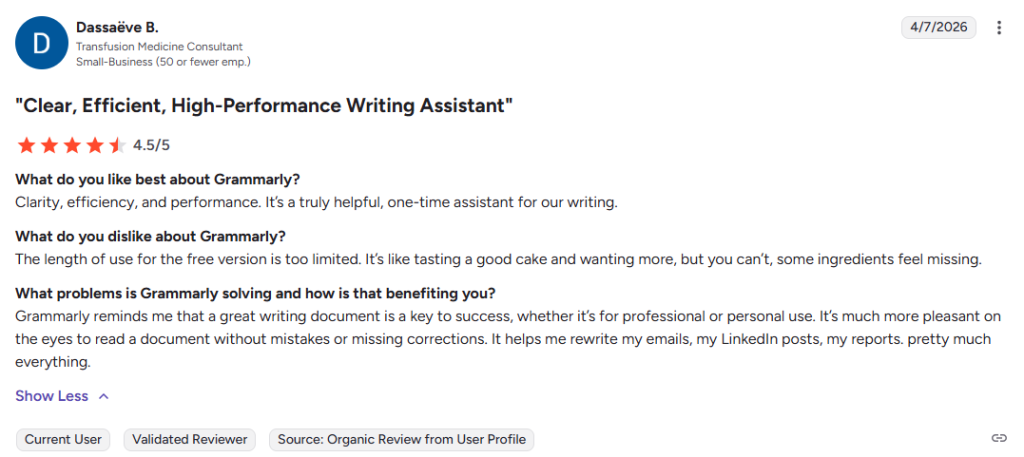
Students, professionals, freelancers, and enterprise teams have shared feedback on Grammarly’s real-world performance. The consensus centers on its ease of use, broad platform coverage, time savings on editing, and the practical value of tone detection for professional communication.
What Users Say About Grammarly
Alternatives of Grammarly
- ProWritingAid Best for authors, novelists, and long-form writers who want deep style analysis beyond grammar checking. Choose it when in-depth writing reports and style improvement matter more than real-time suggestions.
- Hemingway Editor Best for writers who want to simplify and strengthen their writing style. Choose it when readability and concise sentence structure are the priority over comprehensive grammar checking.
- QuillBot Best for students and writers who need AI paraphrasing, summarizing, and grammar checking in one tool. Choose it when rewriting and rephrasing existing content is a frequent part of your workflow.
- Jasper Best for content teams and marketers who need AI-powered long-form content generation alongside writing assistance. Choose it when original content creation at scale matters more than grammar correction.
- Microsoft Editor Best for Microsoft 365 users who want a built-in writing assistant across Word, Outlook, and Edge. Choose it when you are already paying for Microsoft 365 and want basic writing assistance at no extra cost.
- Wordtune Best for professionals who want AI-powered sentence rewrites and tone adjustment without a full grammar checking suite. Choose it when rewriting for clarity and conciseness is the primary need.
- LanguageTool Best for multilingual writers and teams who need grammar and style checking across multiple languages. Choose it when non-English writing support is a core requirement for your workflow.


