
What Is Windsurf (formerly Codeium)?
Windsurf, formerly known as Codeium, is an AI-powered coding platform that helps developers write, complete, and refactor code faster directly inside the IDEs they already use. It officially rebranded from Codeium to Windsurf in April 2025, reflecting its evolution from an autocomplete plugin into a full AI-native development platform.
Individual developers and enterprise engineering teams use Windsurf to eliminate repetitive coding tasks, navigate large codebases faster, and ship better software with less manual effort.
Who It Is For
Individual developers, full-stack engineers, data scientists, and enterprise engineering teams who want AI assistance without disrupting their existing workflow or switching editors.
Best Use Case
Real-time, context-aware code completion and agentic task execution through the Windsurf Editor helping developers stay in flow without tab-switching or manual lookups.
Standout Value
A usable free plan with unlimited Tab completions, plus a fully agentic IDE experience through Windsurf Editor and enterprise-grade self-hosted deployment for teams with security and compliance requirements.
Setup Time and Support
Most developers are up and running in under 10 minutes via the Windsurf Editor install or IDE plugin. Free users get documentation and community support. Paid and enterprise plans include dedicated support options.
Why Windsurf Stands Out
Unlike general-purpose AI chatbots, Windsurf is built exclusively for code. Its Cascade agent reads your open files, recent edits, and entire project structure to plan and execute multi-step changes across multiple files at once, not just complete a single line.
Windsurf Key Features
- AI Code Autocomplete (Tab and Supercomplete): Real-time inline suggestions as you type plus predictive next-edit suggestions based on recent changes, cutting time spent on repetitive code and boilerplate
- Cascade Agentic AI: Ask Windsurf to plan and execute multi-step coding tasks across multiple files, run terminal commands, and iterate on results, all without leaving the editor
- In-Editor AI Chat: Ask questions and request refactors without leaving your editor, with no browser tab switching mid-task
- Automatic Codebase Indexing: Windsurf indexes your entire repository automatically using retrieval-augmented generation so suggestions are grounded in your actual project, not generic patterns
- Live Preview: See a real-time visual preview of UI changes before applying them, removing guesswork from frontend edits
- Multi-IDE Support via Windsurf Plugins: Works with VS Code, JetBrains, Neovim, Vim, Xcode, and more with no forced editor switch
- Multi-Language Support: Covers 70+ languages including Python, JavaScript, TypeScript, Go, Rust, and Java
- Model Flexibility: Choose between Windsurf proprietary SWE models, Claude, and GPT models depending on the task
- Self-Hosted and On-Premises Deployment: Run Windsurf inside your own infrastructure, built for teams with strict data and compliance requirements
- Security and Access Controls: SOC 2 Type II certified, Zero Data Retention defaults for Teams and Enterprise, SSO, SCIM, RBAC, and audit logs for enterprise security needs
Pros and Cons of Windsurf
Pros
- Generous Free Tier: Unlimited Tab completions and Previews at no cost, one of the stronger free offerings in the AI coding tool space
- Full Agentic IDE: The Windsurf Editor goes beyond autocomplete with Cascade handling multi-step, multi-file tasks autonomously
- Automatic Context Retrieval: Codebase indexing is hands-off, no need to manually tag files or specify context like some competing tools require
- Broad IDE and Language Coverage: 70+ languages and multiple editor plugins means most developers can use Windsurf without changing their existing setup
- SOC 2 Type II Certified: Verified security posture with Zero Data Retention defaults for Teams and Enterprise plans
- Model Flexibility: Switch between Windsurf SWE models, Claude, and GPT depending on the complexity of your task
- Quick Onboarding: Up and running in under 10 minutes via the Windsurf Editor install or IDE plugin
Cons
- Full Agentic Experience Requires Editor Switch: The complete Cascade experience is only available in the Windsurf Editor. Plugin users on VS Code and JetBrains get autocomplete and lightweight chat but not every Editor-only workflow
- Credit-Based Pricing Model: Prompt credits can run out on lower-tier plans, which may frustrate heavy users who relied on unlimited usage under the old Codeium free tier
- Less Brand Recognition Than Copilot: May face credibility hurdles in enterprise procurement compared to Microsoft-backed alternatives
- Cascade on JetBrains Is Still in Beta: Enterprise teams on JetBrains IDEs may find the plugin feature set more limited compared to the full Windsurf Editor experience
- Ownership Uncertainty: Following the Google leadership deal and acquisition by Cognition AI in 2025, some enterprise teams may want to monitor product roadmap continuity before committing
Windsurf Pricing Plans
Windsurf pricing information is subject to change. Always verify current rates, features, and any available Windsurf coupon or Codeium discount directly on windsurf.com before making a purchasing decision.
| Plan | Price | Included Features |
| Free | $0 | Light quota to code with agents Limited model availability Unlimited inline edits Unlimited Tab completions |
| Pro | $20 per month | Everything in Free, plus: Increased quotas, including access to frontier OpenAI, Claude, and Gemini models |
| Max | $200 per month | Everything in Pro, plus: Significantly higher quotas |
| Teams | $40 per user / month | Everything in Pro, plus: Centralized billing Admin dashboard with analytics Priority support Automated zero data retention |
| Enterprise | Let’s talk | Everything in Teams, plus: Highest priority support |
Windsurf Reviews
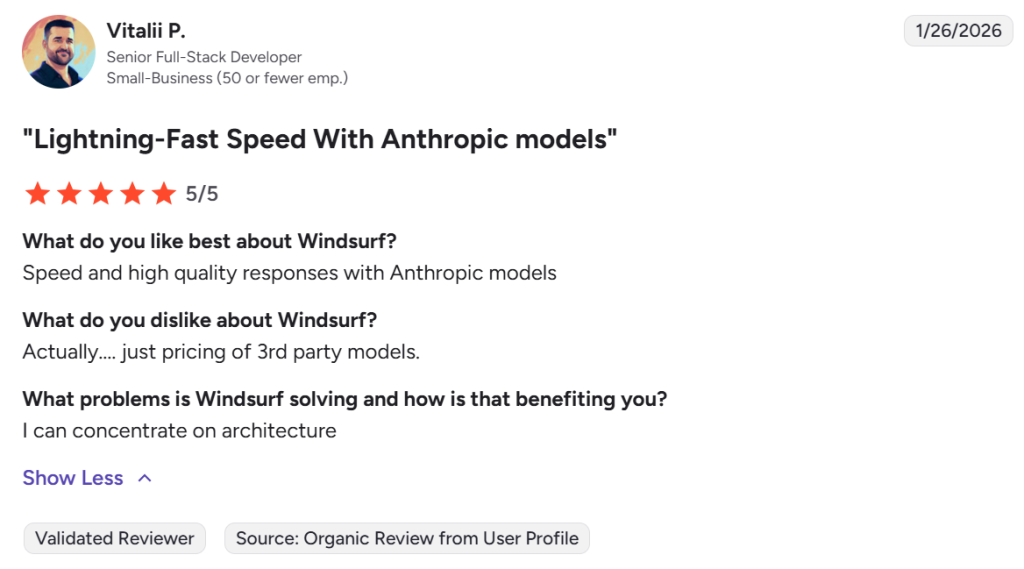
Developers across skill levels have shared feedback on Windsurf’s performance in real-world workflows. The consensus generally centers on Cascade’s agentic capabilities, autocomplete speed, and the value of the free tier compared to paid competitors.
What Users Say About Windsurf
Windsurf Top Integrations
- Visual Studio Code: Full autocomplete, chat, and Cascade available via Windsurf Plugin, the most widely used integration
- JetBrains IDEs (IntelliJ, PyCharm, WebStorm, GoLand): Available via the Windsurf Plugin for JetBrains, covering Java, Python, and web developers with agentic Cascade support in beta
- Neovim and Vim: Plugin support for developers who prefer terminal-first, keyboard-driven workflows
- Xcode: Windsurf Plugin available for iOS and macOS developers working in Apple’s native development environment
- Jupyter Notebooks: AI autocomplete inside notebook environments, useful for data scientists and ML engineers
- GitHub: Works alongside GitHub-hosted repositories using local repo context and MCP server integration for smarter suggestions
- GitLab: Teams using GitLab for source control can use Windsurf within their local dev environments
- MCP Servers (Model Context Protocol): Connect external tools including GitHub, GitLab, Slack, Jira, and Notion to give Cascade deeper context about your project and workflows
- Self-Hosted Git Servers: On-premises deployment supports private and air-gapped source control environments
Alternatives of Windsurf
- GitHub Copilot Best for teams standardized on GitHub and the Microsoft ecosystem. Choose it when enterprise Microsoft support and deep GitHub workflow integration are a priority.
- Cursor Best for developers who want a fully AI-native editor with manual context control. Choose it when you prefer specifying your own context over automatic codebase indexing.
- Tabnine Best for teams with strict data privacy needs. Choose it when offline or fully private deployment is non-negotiable.
- Amazon CodeWhisperer (Amazon Q Developer) Best for AWS-centric teams. Choose it when your stack lives entirely on AWS and you want suggestions optimized for AWS APIs and services.
- Sourcegraph Cody Best for large engineering teams with complex multi-repo codebases. Choose it when codebase search at scale matters as much as AI suggestions.
- Continue Best for developers who want full control with no vendor lock-in. Choose it when open-source and self-hosted is the only acceptable option.