What Is Kaedim?
Kaedim is an AI powered 3D asset production platform for studios and brands, so kaedim coupon intent should be checked against its live pricing page before assuming a public coupon code exists. Kaedim helps teams create production ready 3D assets for games, product design, e-commerce, and studio pipelines. Its official site positions the product around speed, production quality, enterprise support, and custom art and technical specifications.
Kaedim combines machine learning with an in-house art team to generate 3D assets from images. Its documentation states that Kaedim supports game developers, Fortune 100 companies, commerce teams, architecture teams, product design teams, and animation teams.
Who It Is For
Kaedim is for game studios, 3D teams, agencies, product design teams, e-commerce brands, and enterprise teams that need recurring 3D asset production. The strongest fit is teams that need production ready 3D models without scaling headcount or managing traditional outsourcing agencies.
Best Use Case
Kaedim is best used for turning 2D images, sketches, concept art, and production briefs into usable 3D assets. The documentation states that users can upload a single image, 2D sketches, and line work, with supported input formats including PNG, JPG, and JPEG.
Standout Value
Kaedim’s standout value is its AI assisted asset pipeline with human quality control, custom styles, and studio workflow support. Kaedim states that its pipeline uses machine learning and in-house artists to refine outputs and maintain production quality.
Setup Time and Support
Kaedim uses a structured setup path for professional teams because its workflow starts with demo, trial, onboarding, custom styles, and dedicated support. The official process includes a demo, a tailored trial or pilot period, workspace setup, team onboarding, custom styles, and a dedicated communication channel for support.
Why Kaedim Stands Out
Kaedim stands out because it connects AI generated 3D assets, artist refinement, export formats, API access, and custom integrations for production teams. The integrations page lists Unity, Unreal Engine, Shotgrid, Blender, Nvidia, Autodesk, and Cinema 4D, with custom integrations available on demand.
Key Features
Kaedim’s key features focus on AI assisted 3D asset generation, human artist refinement, game ready outputs, export formats, custom styles, and production workflow integrations.
| Feature | What it does | Why it matters |
| 2D to 3D asset generation | Converts 2D images into 3D models through Kaedim’s AI powered workflow. | Helps teams start asset production from sketches, photos, concept art, and visual references. |
| Human artist refinement | Uses an in-house art team to refine generated outputs. | Improves quality control for teams that need usable production assets, not raw AI drafts. |
| Game ready assets | Creates optimized, textured, and, when needed, rigged 3D characters or props. | Supports game development workflows where topology, textures, rigs, and levels of detail matter. |
| Asset specifications | Lets users define dimensions, tags, markups, art specifications, and technical specifications. | Gives teams control over scale, style, topology, pivot points, and modeling requirements. |
| Export formats | Supports downloads in GLB, GLTF, OBJ, FBX, USD, textured OBJ, and image formats. | Helps teams move finished assets into 3D software, game engines, and rendering workflows. |
| Custom Styles | Supports geometry fine tuning, custom textures, custom rigging, custom LoDs, and custom export requirements for Enterprise customers. | Fits studios that need assets matched to internal art direction, engine constraints, and production standards. |
| API and integrations | Connects Kaedim with external workflows through no code integrations, APIs, plugins, and custom integrations. | Helps production teams connect asset generation with internal pipelines instead of using the web app only. |
| Unity plugin | Lets users view available assets, upload new images, generate assets, and download models inside Unity. | Reduces handoff friction for game teams using Unity in their production stack. |
Kaedim Top Integrations
Kaedim Top Integrations connect AI generated 3D assets with game engines, 3D creation tools, production tracking systems, and custom studio pipelines.
- Unity, connects Kaedim assets with Unity projects through a plugin workflow for uploading images, generating assets, and downloading models.
- Unreal Engine, connects Kaedim with Unreal Engine projects for game development and 3D production workflows.
- Blender, connects Kaedim with a common 3D creation workflow for artists and studios managing model edits and asset preparation.
- Shotgrid, supports production pipeline workflows where teams track assets, tasks, and review stages across studio projects.
- Nvidia, supports 3D pipeline connectivity for teams using Nvidia related production workflows.
- Autodesk, supports studio teams that use Autodesk software inside 3D modeling, animation, and asset production workflows.
- Cinema 4D, supports motion design and 3D content teams that need Kaedim assets inside a broader 3D production stack.
- Custom integrations, connect Kaedim with proprietary tools, asset systems, rendering engines, version control platforms, and studio specific workflows.
Pros and Cons of Kaedim
Kaedim’s main buying tradeoff is faster production ready 3D asset creation with human support, balanced against credit based pricing, custom workflow requirements, and limited public discount availability.
| Pros | Cons |
| Production-Ready 3D Assets:
Built specifically for studios and professional workflows across games, product design, and e-commerce. |
Studio-Focused Pricing:
Higher entry costs ($400–$1,200+) make it more suitable for professional teams than casual creators. |
| “Game Ready” Pipeline:
Covers detailed assets with optimized geometry, textures, rigs, and LoDs reviewed by human artists. |
Manual Review Turnaround:
Assets use a staged human-in-the-loop review process, which means generation is not instant or “one-click”. |
| Broad Export Compatibility:
Supports standard industry formats including GLB, GLTF, OBJ, FBX, USD (USDZ), and images. |
External Software Dependency:
Teams still require compatible 3D modeling software or game engines to use exported models effectively. |
| Feature-Rich Paid Tiers:
Paid plans include credits, geometry limits, complete asset options, and priority processing on higher tiers. |
No Permanent Free Plan:
There is currently no permanent free tier listed on the public pricing page for ongoing use. |
| Custom Enterprise Workflows:
High-level plans offer tailored rigging, custom styles, and specific export requirements for large pipelines. |
High-Touch Onboarding:
Enterprise setup depends on specific requirements and custom integrations, requiring a demo and pilot period. |
| Low-Risk Trial Access:
A 7-day trial is available for $50 (50% off) to allow for testing before committing to a full subscription. |
Lack of Public Coupons:
The official FAQ states that no active public discounts or coupon codes are currently offered. |
Kaedim Pricing Plans
The information may change. For the most accurate, up to date, and full feature breakdowns, please visit the official Kaedim pricing page.
| Plan name | Price | What it includes |
| Trial | $50 for 7 days, shown as 50% off from $100 | 5 credits, up to 5 geometries, and a 7 day trial that renews to Indie automatically. |
| Indie | $400 per month | 20 credits, up to 20 geometries, or 1 complete asset with high quality retopology, UVs, and textures, plus dedicated Discord support. |
| Pro | $1,200 per month | 60 credits, up to 60 geometries, or 3 complete assets with high quality retopology, UVs, and textures, plus priority processing and dedicated Discord support. |
| Enterprise | Custom pricing | Custom plan scope can include tailored onboarding, custom styles, custom integrations, enterprise support, and production volume planning. |
Kaedim does not show a standard public kaedim coupon code or kaedim discount coupon path on the pricing page reviewed. The visible Kaedim discount is the Trial price marked 50% off, while the FAQ states that Kaedim does not currently offer discounts and directs early stage startups to contact the team.
Reviews
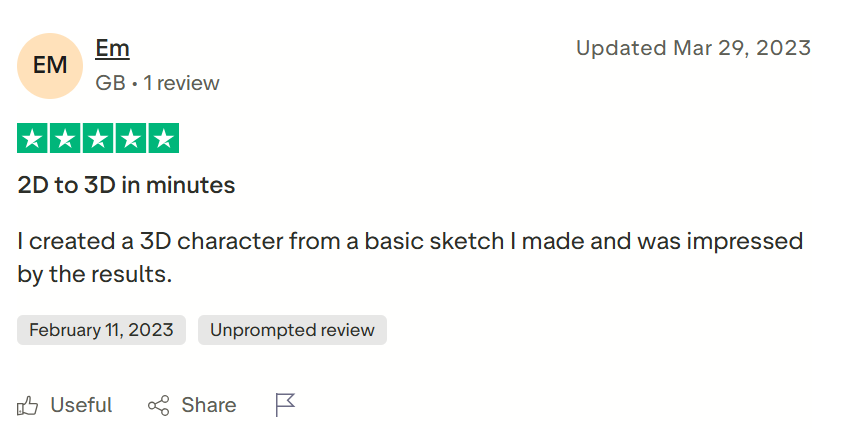
Kaedim reviews have limited coverage on major software review platforms, with Capterra showing 0 user reviews while Trustpilot have average rating of 3.6 and a 0.0 overall rating at the time reviewed. Buyers should treat public review data as limited and verify fit through a trial, demo, asset quality checks, export testing, and pipeline testing.
Alternatives of Kaedim
Kaedim alternatives include AI 3D model generators, 3D design platforms, game asset tools, and production workflow platforms for teams comparing asset quality, speed, export formats, and studio pipeline fit.
- Meshy, best for creators, 3D artists, and game developers that need text to 3D, image to 3D, AI texturing, and downloadable model formats.
Choose it when fast self serve 3D generation matters more than Kaedim’s artist reviewed production workflow. - Tripo, best for users that want to generate 3D models from text or images with AI texturing, model segmentation, auto rigging, and stylization.
Choose it when broad AI 3D creation features and quick browser based generation are stronger priorities than human refinement. - Hyper3D Rodin, best for digital artists, game developers, and creative professionals that need AI generated 3D assets from images or prompts.
Choose it when lower friction AI 3D model generation is a better fit than Kaedim’s credit based studio plan structure. - Spline, best for teams that need browser based 3D design, real time collaboration, interactive 3D experiences, and AI assisted 3D generation.
Choose it when interactive 3D design and web based collaboration matter more than outsourced style production for game ready assets. - Scenario, best for game teams and creative operations teams that need on brand AI asset generation across game visuals, marketing content, 3D assets, video, and audio.
Choose it when creative asset consistency and game marketing workflows matter more than Kaedim’s 2D to 3D production pipeline. - Masterpiece X WorldEngen, best for studios that want an AI copilot for 3D scene production inside Blender, Unity, and Unreal Engine workflows.
Choose it when full scene production and engine connected workflows matter more than single asset generation. - Promethean AI, best for professional teams that need AI asset management, virtual world creation, prototyping, set dressing, and production workflow support.
Choose it when managing and arranging existing 3D assets is more important than generating new models from 2D references.