FlexClip Annual Deal
Go annual on FlexClip Plus or Business and save up to $120 a year, already built into the price.
SHORT SUMMARY
- Get the latest verified FlexClip coupon code and choose the right plan before you subscribe.
- Learn what FlexClip offers, how much each plan costs, and how AI credits are actually used.
- See my hands-on experience using FlexClip to turn a blog post into a social media video in minutes.
- Compare FlexClip vs CapCut, InVideo, Canva, VEED.io, Adobe Express, VideoGen, and Filmora to find the best fit.
- Discover FlexClip’s biggest strengths, limitations, and whether it’s the right video editor for your needs.
What Is FlexClip?
FlexClip is an online video editor that helps you create videos from text, images, or blog content in just a few minutes. It runs in your web browser, so you can start creating without installing software or having previous video editing experience.
Key Features of FlexClip
FlexClip includes everything you need to create and edit videos in one place. From turning text into videos to adding subtitles automatically, its tools help you create content faster with less manual work.
| Feature | What It Does |
| Text to Video | Turn text or blog posts into ready-to-edit videos in minutes. |
| Script Generator | Create video scripts from a topic or keyword. |
| Auto Subtitles | Add accurate captions automatically in multiple languages. |
| Text to Speech | Convert text into natural-sounding voiceovers. |
| Brand Kit | Save your logo, colors, and fonts for consistent branding. |
| Background Remover | Remove image backgrounds with a single click. |
| Stock Media Library | Access millions of royalty-free videos, photos, and music tracks. |
| Cloud Workspace | Save projects online and work from any browser or device. |
Which FlexClip Pricing Plan Should You Choose?
FlexClip offers several pricing plans for different types of users, from beginners to businesses. You can choose a subscription with more features or buy AI credits separately if you only use its video generation tools occasionally.
Quick pick: Go with Plus if you post a few videos a week. Upgrade to the Business plan only if you regularly use video generation, image generation, and other premium features, so you get the most value from the extra credits.
| Plan | Price (Annual) | Best For | What You Get |
| Free | $0 | Testing it out | 720p, watermark, 10-min videos |
| Plus | $11.99/mo | Solo creators & YouTubers | 1080p, no time limit, 3,600 AI credits/yr |
| Business | $19.99/mo | Teams & agencies | 4K, full stock library, 12,000 AI credits/yr |
| AI Credits | From $9.99 | Occasional AI use | No subscription, just pay for credits |
Pro Tip: Use the flexclip coupon FLEXCLIP10 during the checkout process to receive an additional 10% discount on any annual subscription plan.
The Information may change for the most accurate, up-to-date, and full feature breakdowns, please visit the official FlexClip website.
How AI Credits Actually Get Spent
Credits run out fast if you don’t know where they go. Here’s the real breakdown:
| Feature | Credit Cost |
| AI Video Generator | 1 credit |
| AI Image Generator | 1 credit |
| AI Image-to-Image | 2 credits |
| AI Auto Subtitle | 2 credits/min |
| AI Text-to-Speech | 1 credit/250 characters |
| Background Removal | 1 credit |
Bottom line: subtitling and text-to-speech burn credits fastest. If that’s your main use, budget more credits than you think you’ll need.
Hands-On Testing: What I Actually Found
I tested FlexClip by turning one of my blog posts into a short social media video. After adding the blog URL, FlexClip created a complete video draft in less than 3 minutes. I only made a few small changes, like adjusting the scene order and changing the font, before it was ready to publish.
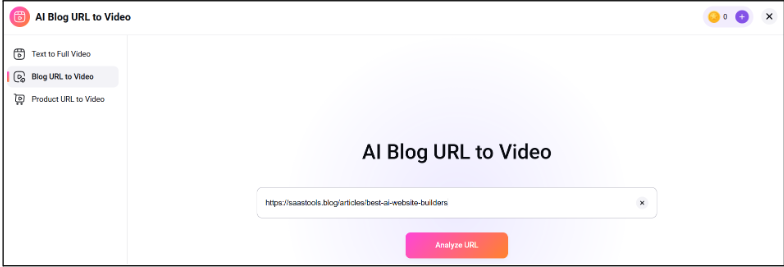
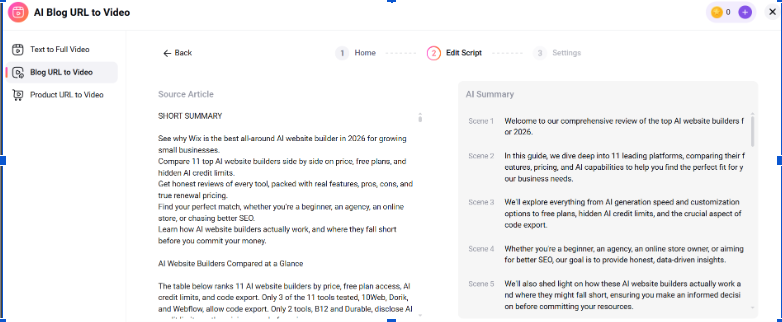
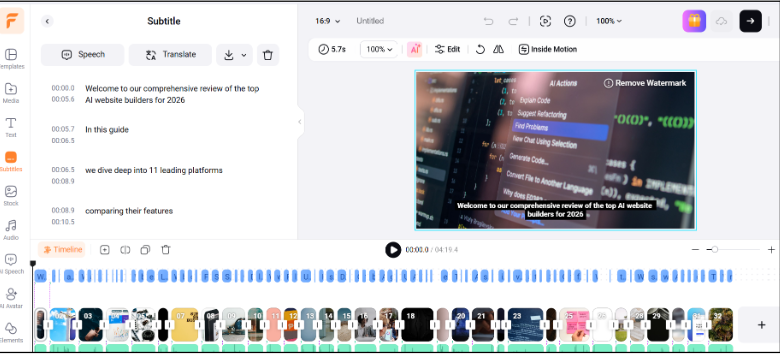
The AI auto-subtitle tool stood out the most: fast, accurate, and genuinely saves time versus typing captions by hand.
FlexClip User Reviews
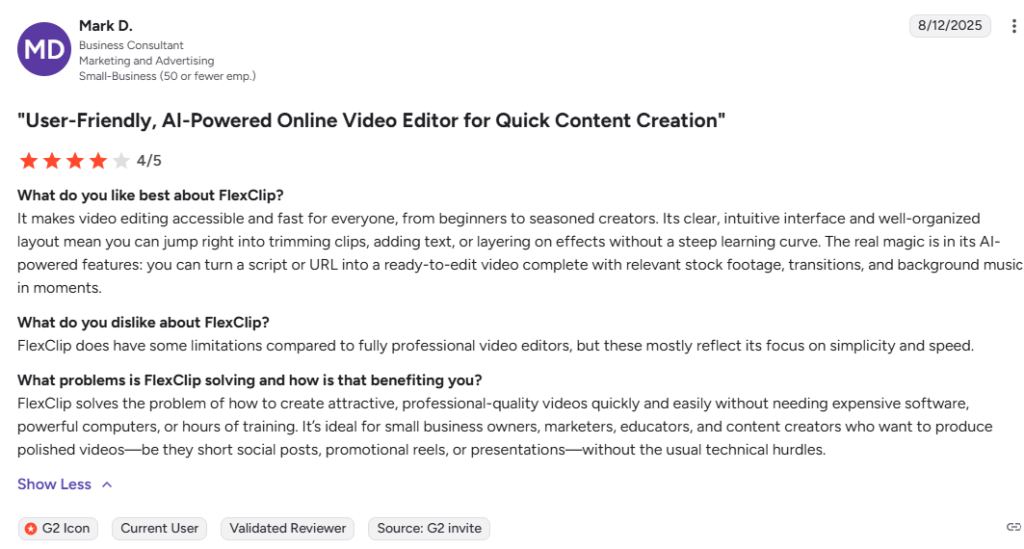
Many content creators, marketers, and small business owners like FlexClip because it’s easy to use and doesn’t take long to learn. It helps them create professional-looking videos quickly with ready-made templates, simple editing tools, and a large library of stock media.
Reviewers often mention that the AI subtitle generator and text-to-video tools are massive time-savers for marketing teams. While some note that rendering can be slower on very large projects, the overall consensus is that it offers exceptional value for those who need professional-looking videos without a steep learning curve.
FlexClip vs Alternatives
FlexClip vs CapCut
FlexClip is the better choice if you want to create videos from text or blog posts in just a few minutes. CapCut is a stronger option for editing short videos on mobile, especially for TikTok and Instagram Reels.
FlexClip vs InVideo
Both offer AI text-to-video. FlexClip is faster and simpler to use for quick marketing clips. InVideo is the better pick for longer, script-heavy ad production.
FlexClip vs Canva
FlexClip focuses on AI video creation with built-in editing tools, animations, and stock media. Canva is better if your work combines graphic design, presentations, and social media content in one platform.
FlexClip vs VEED.io
Both platforms are browser-based and beginner-friendly. FlexClip offers more AI-powered video creation features, while VEED.io stands out for automatic subtitles, video resizing, and online collaboration.
FlexClip vs Adobe Express
FlexClip is built for quick AI video production and marketing content. Adobe Express is better for businesses that need premium Adobe design assets, branding tools, and polished visual content.
FlexClip vs VideoGen
Both tools use AI to speed up video production. FlexClip provides more editing control, templates, and customization options. VideoGen focuses on generating simple videos from text in the shortest possible time.
FlexClip vs Wondershare Filmora
FlexClip is a browser-based editor that makes creating videos simple, even for beginners. Filmora offers advanced timeline editing, effects, and color grading for users who want more creative control.
What Are the Pros and Cons of FlexClip?
FlexClip is easy to use and offers powerful AI video tools for fast content creation. However, its free plan has limitations, and advanced editing features are less capable than professional video editors.
Pros:
- Fast — a usable video draft in minutes
- Genuinely easy for beginners, no learning curve
- Strong AI auto-subtitle tool
- Works fully in-browser, nothing to install
Cons:
- AI credits run out quickly on the Plus plan if you use it daily
- Not built for advanced color grading or frame-by-frame editing
- Free plan is watermarked and capped at 720p
Who Should Use FlexClip?
FlexClip is best for users who want to create professional videos quickly without advanced editing skills. It’s a great fit for marketing, social media, and business content, but it may not suit creators who need professional-grade editing tools.
Use FlexClip If You…
- You’re a marketer creating ads, promos, or product videos.
- You run a small business and need professional videos on a budget.
- You create content for YouTube, TikTok, Instagram, or Facebook.
- You want AI to turn text, blogs, or ideas into videos quickly.
- You prefer a simple, browser-based video editor with no installation.
Skip FlexClip If You…
- You need frame-by-frame editing or advanced color grading.
- You require realistic AI avatars for talking-head videos.
- You edit complex, multi-layer video projects regularly.
- You want full creative control like Adobe Premiere Pro or DaVinci Resolve.
Ready to create videos faster? Try FlexClip today and claim the latest discount before you subscribe.