

What Is Visme?
Visme is a professional visual communication platform that enables users to create presentations, infographics, and interactive documents. It provides businesses with a centralized dashboard to manage and distribute brand-compliant assets across multiple marketing channels effectively.
The software helps organizations transform complex data into engaging visual stories through customizable templates and a vast library of stock assets. Utilizing a visme coupon allows small teams to access premium features and higher storage limits for their creative projects.
Who It Is For
Business professionals, marketing teams, and educators use this platform to create visually compelling content for their internal and external communications.
Best Use Case
Creating interactive data visualizations and corporate presentations that require high interactivity is the primary use case for this versatile design tool.
Standout Value
The platform provides a unique ability to export projects in HTML5 format which maintains full animation and interactivity when embedded into websites.
Setup Time and Support
Setting up a new project takes less than 5 minutes and paid users receive technical assistance through 24/7 email and live chat support.
Why Visme Stands Out
It combines standard graphic design features with powerful analytics and brand management tools that are usually reserved for high end enterprise design suites.
Feature Name | Description and Benefits |
AI Designer | This tool converts text prompts into ready to use designs and presentations within seconds to save time for creators. |
Data Visualization | It features 50 plus charts and graphs that allow users to transform raw data into interactive visuals easily. |
Brand Kit | It stores your logos and fonts to ensure all content remains compliant with your company branding guidelines automatically. |
Interactivity | This feature allows users to add hover effects and clickable hotspots to engage their audience effectively during presentations. |
Template Library | It provides thousands of professionally designed layouts for presentations and social media graphics across various specialized industries. |
Collaboration Tools | These allow teams to leave comments and work together on projects in real time from any location globally. |
Content Calendar | It enables users to schedule and publish their social media posts directly from the centralized platform interface. |
Asset Library | It contains millions of high resolution stock photos and icons to enhance the visual appeal of every project. |
Pros and Cons of Visme
Visme provides organizations with a powerful suite of design tools to improve their visual communication strategies. Using this platform allows teams to create high quality interactive content without relying on multiple external software subscriptions.
Pros
- High Quality Templates, access thousands of professionally designed layouts for presentations to save time on every project.
- Interactive Elements, add hover effects and clickable hotspots to engage your audience and create immersive digital documents.
- Data Visualization Tools, use over 50 charts and graphs to transform raw data into easy to understand visual stories.
- Asset Library, utilize millions of free stock photos and icons to enhance your designs without using external tools.
- Brand Kit, store logos and fonts to ensure all content remains compliant with your company branding guidelines.
- Team Collaboration, allow members to leave comments and edit projects simultaneously to improve design efficiency and creative quality.
Cons
- Limited Free Version, the free plan includes watermarks and restricts access to many premium templates and download options.
- Pricing Structure, the cost for advanced features is significant for solo entrepreneurs compared to simpler design alternatives.
- Learning Curve, mastering the complex interactive animations and data integration features requires significant time and training for beginners.
- Browser Performance, editing very large projects with many high resolution assets can lead to slower browser speeds and lag.
Visme Pricing Plans
Visme pricing includes four tiers designed for students, freelancers, and large organizations. Selecting an annual plan provides a significant visme discount for every professional design user.
Plan Name | Monthly Cost | Ideal User | Key Unique Features |
Basic | Free | Beginners | 100 MB storage and regular templates. |
Starter | $29.00 | Individuals | Including all in Basic + 250 MB storage and full assets. |
Pro | $59.00 | Professionals | Including all in Starter + 3 GB storage and Brand Kit. |
Enterprise | Custom | Corporations | Including all in Pro + 10 GB storage and SSO security. |
For the most accurate, up-to-date, and full feature breakdowns, please visit the official Visme website.
Visme Top Integrations
- HubSpot
- Mailchimp
- Zapier
- Google Drive
- Dropbox
- OneDrive
- SurveyMonkey
- Slack
- Google Analytics
- JotForm
Visme Reviews
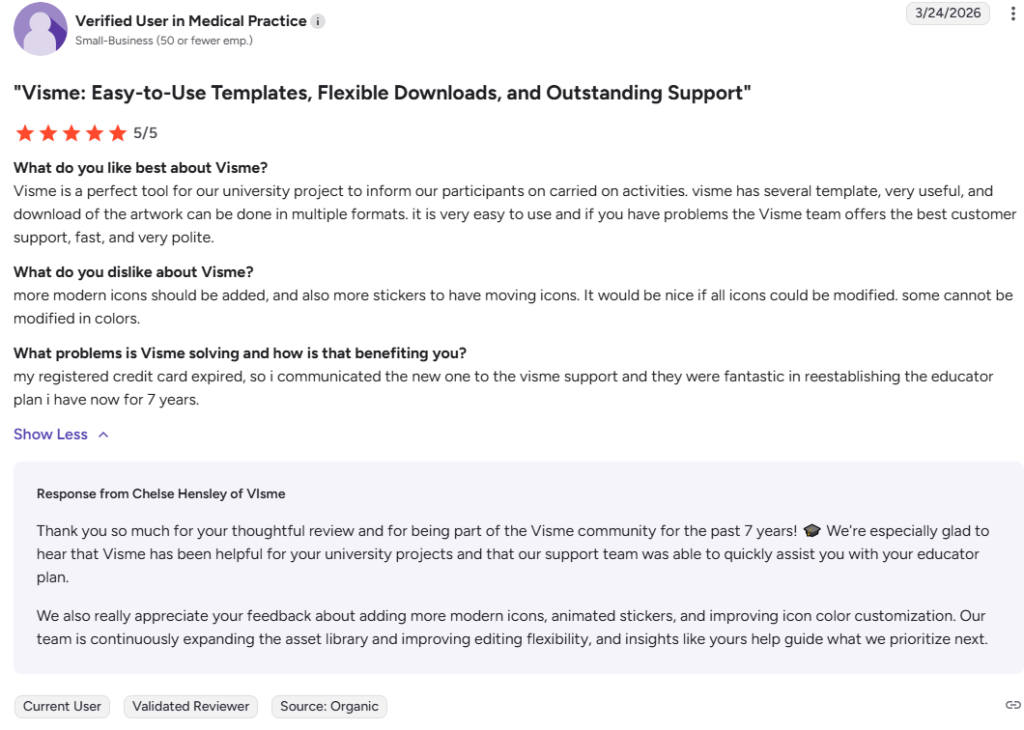
Marketing professionals rate the platform highly because it provides extensive data visualization tools and interactive design capabilities. These features allow users to create engaging documents that capture audience attention effectively.
Users highlight the value of having a centralized brand kit to maintain visual consistency across all creative projects. Reviewers indicate that this platform is essential for teams that produce high volumes of visual content.
Alternatives of Visme
Several visme alternatives provide specialized tools for graphic design and data visualization at different price points. These platforms offer various features for presentation creation and social media management for marketing teams.
Choosing an alternative allows creators to find a tool that matches their specific budget and technical requirements perfectly. Most competitors prioritize ease of use or specific industry templates to differentiate their design software.
- Canva, this design platform is best for beginners and small businesses that need a simple way to create social media graphics. Choose it when you prioritize a very large library of templates and a user friendly mobile application.
- Adobe Express, this creative tool is best for social media managers who want to utilize high quality fonts and stock assets from the Adobe ecosystem. Choose it when you already use other Adobe Creative Cloud software for your projects.
- Prezi, this presentation software is best for speakers who want to create non linear and highly dynamic visual stories with zooming effects. Choose it when you need to break away from traditional slide based layouts for your audience.
- Piktochart, this infographic tool is best for educators and data analysts who need to create clear and professional reports quickly. Choose it when your primary focus is on static data visualizations and technical information layouts.
- Venngage, this platform is best for business professionals who need to create infographics and reports with a focus on data storytelling. Choose it when you require specialized templates for human resources or process documentation.
- Infogram, this visualization tool is best for journalists and researchers who need to embed interactive charts and maps into their digital content. Choose it when you want a simple interface dedicated strictly to charts and live data.
FAQ of Visme


